Watch Quick Video
Website Advance Mega Menu Odoo App
Our all-inclusive
Odoo – Website
Advance Mega Menu Odoo App The Website Advance Mega Menu, a premium module designed to shorten the buyer's journey and boost conversions. Unlike standard Odoo functionality that restricts mega menus to nested sub-categories, this app dynamically injects your actual products right into the dropdown interface. By automatically filtering and showcasing the most recently added products for each category, your newest inventory acts as a continuous, zero-maintenance promotional campaign directly in your global header. Customers benefit from a frictionless shopping experience, as one click on a menu item redirects them instantly to the product page. The module comes packed with five striking, fully customizable structural layouts—ranging from alternating checkerboards to sleek, multicolumn designs that support custom background images configurable right from your general website settings. Fully integrated with Odoo’s native drag-and-drop website builder, you can effortlessly swap layouts, adjust widths, and tailor the aesthetic in real-time. Ultimately, this app transforms a standard navigation bar into an interactive, highly visual product showcase that drives immediate sales.
Website Advance Mega Menu Odoo App
- Clicking on any product name in the mega menu instantly redirects the customer straight to the corresponding product detail page.
- Say goodbye to manual menu updates; this module automatically syncs with your Odoo backend to fetch your inventory in real-time.
- Each layout is meticulously structured to balance eye-catching promotional imagery with your direct product links for maximum conversion.
- Capture your customers' attention immediately with smooth, engaging hover effects when they browse the products inside the menu.
- You can configure distinct mega menu layouts and showcase different product catalogs tailored specifically for each of your independent storefronts.
Complete Workflow for Manage Website Advance Mega Menu Odoo App
First we need to activate Website Advance Mega Menu open the Odoo Website frontend, launch the Menu Editor, and add a new "Mega Menu" item to your navigation bar. Next, enter "Edit" mode and use the right-hand customization panel to instantly apply one of the five premium templates, which will automatically populate with your latest products instead of standard sub-categories.
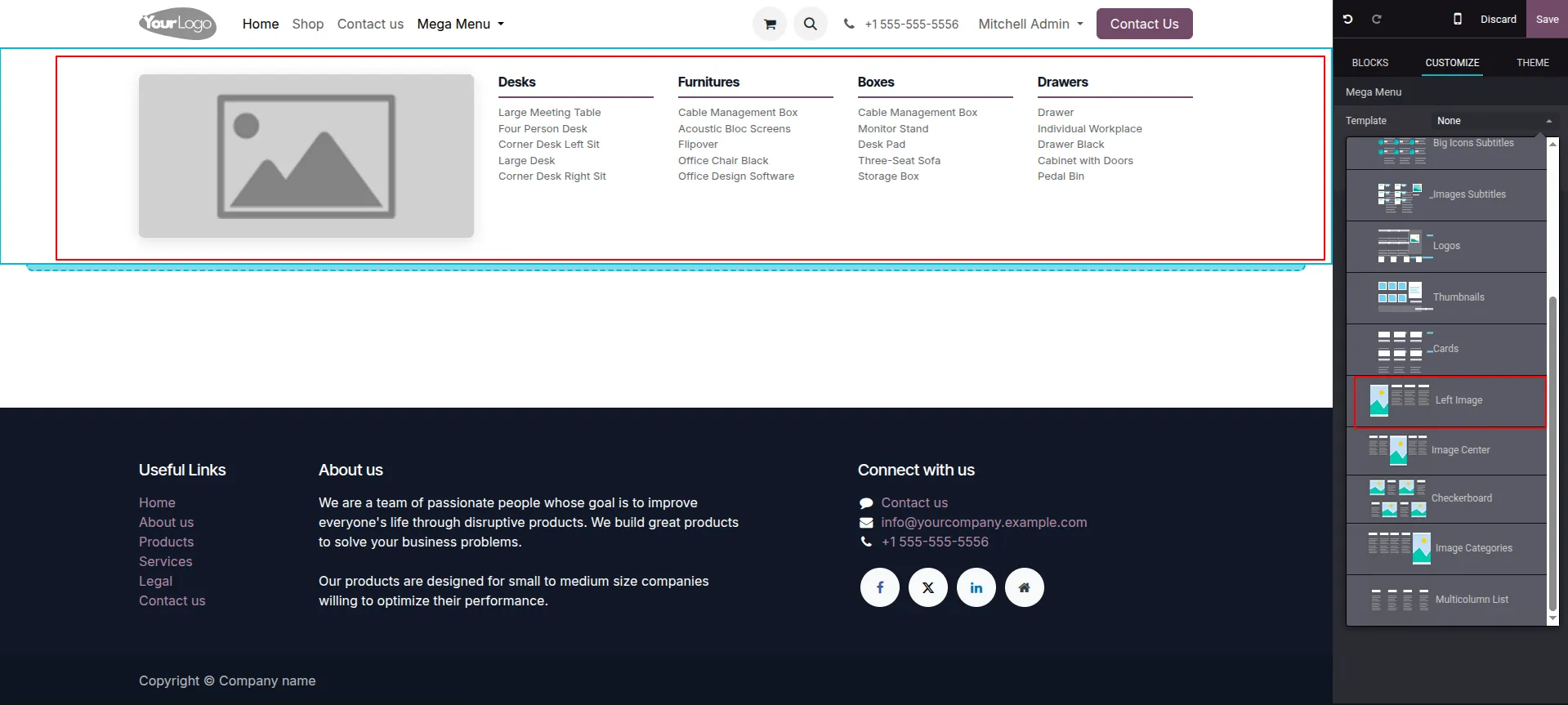
1.In Edit mode, click your Mega Menu and select the Left Image template from the right-hand Customize panel to display a prominent image on the left with your latest products on the right.
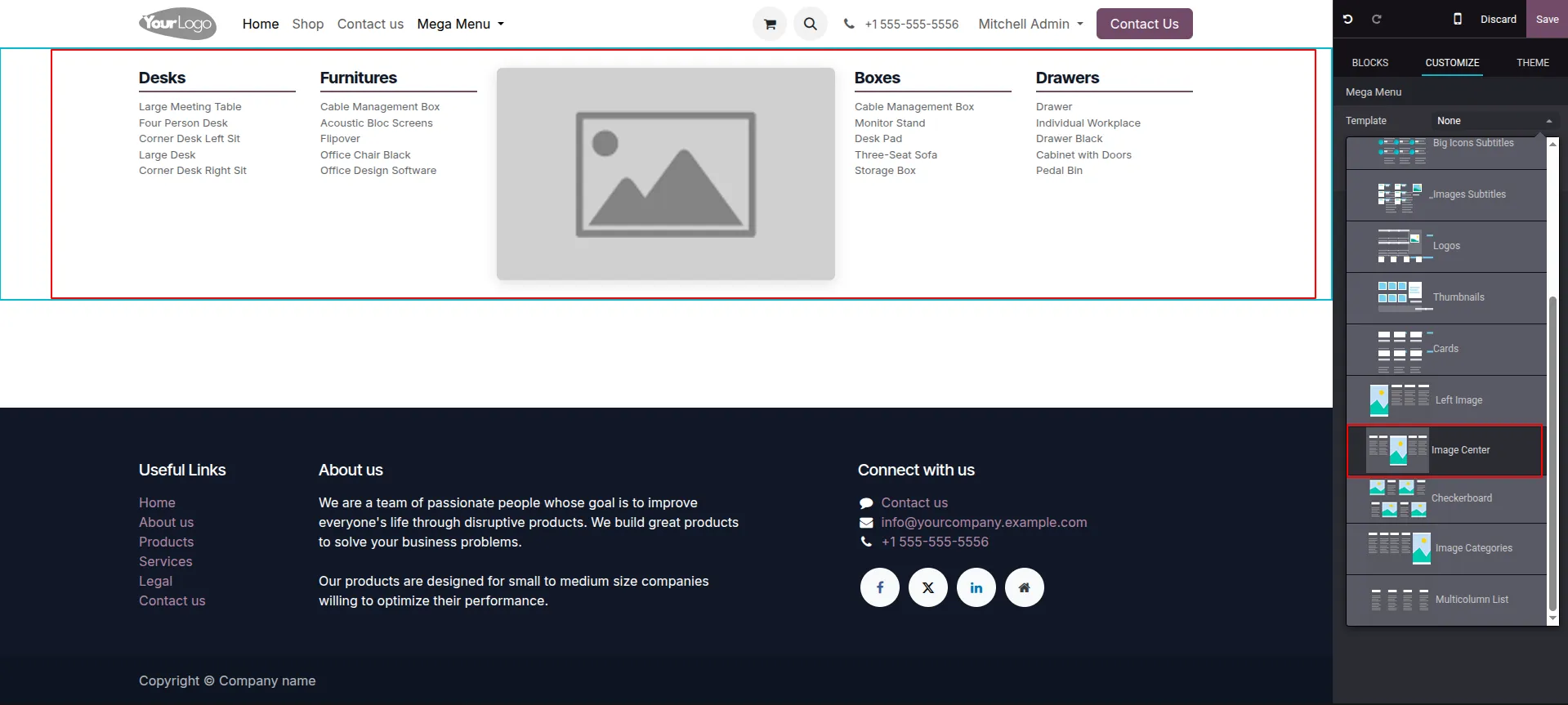
2.While in Edit mode, click the Mega Menu and choose the Image Center template to place a promotional image directly in the middle, flanked by your products on both sides.
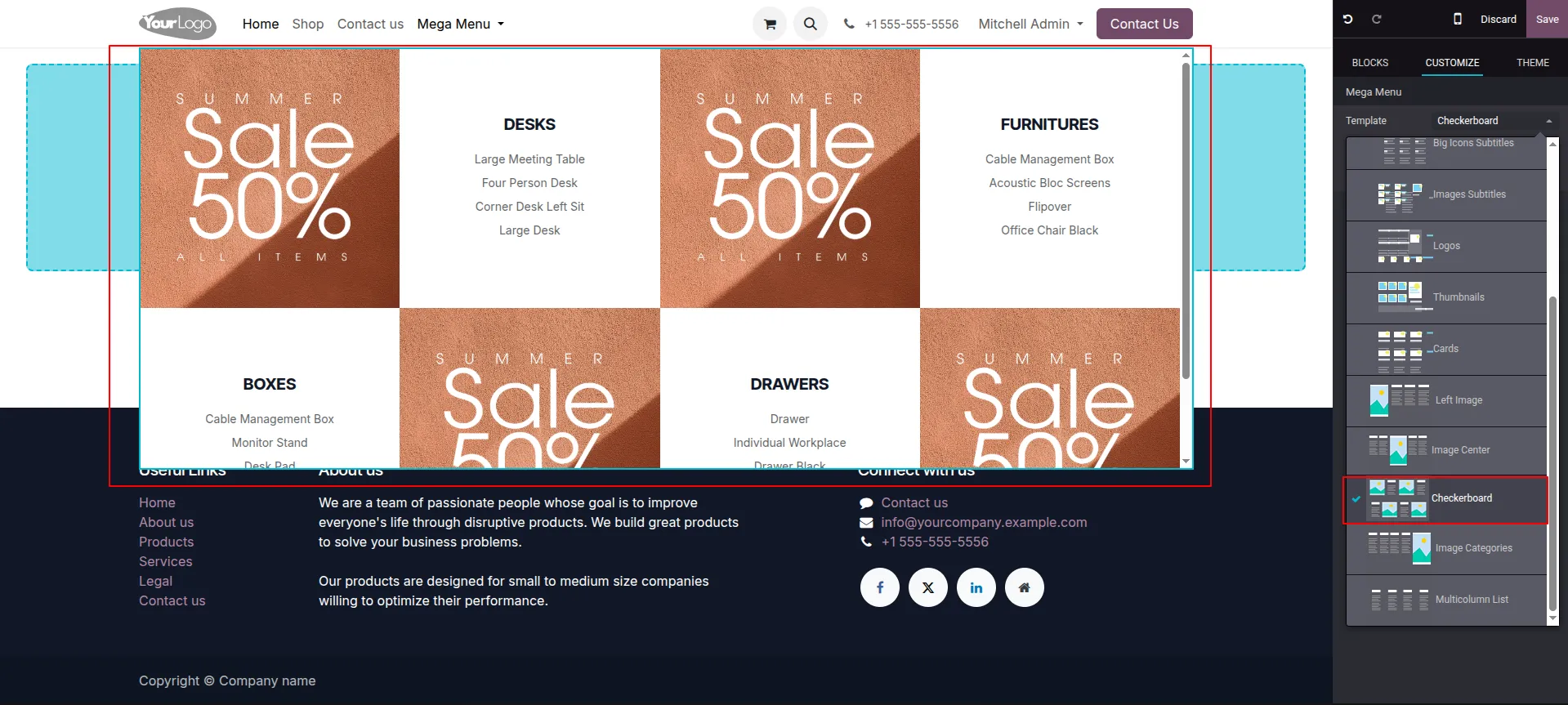
3.Click your Mega Menu in Edit mode and select the Checkerboard template to instantly generate an alternating grid of promotional image blocks and product lists.
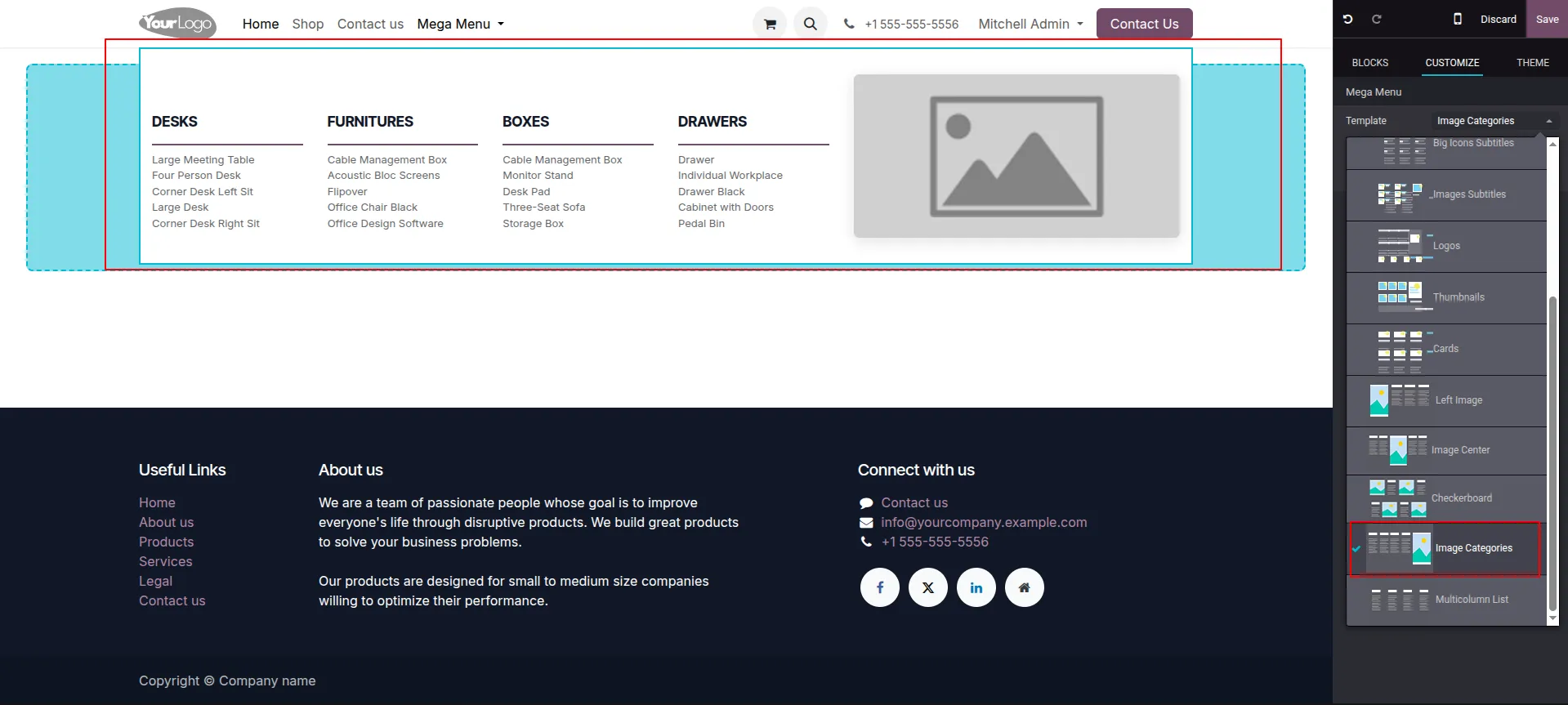
4.In Edit mode, select the Mega Menu and click the Image Categories template to organize your product lists on the left and feature a single promotional image on the far right.
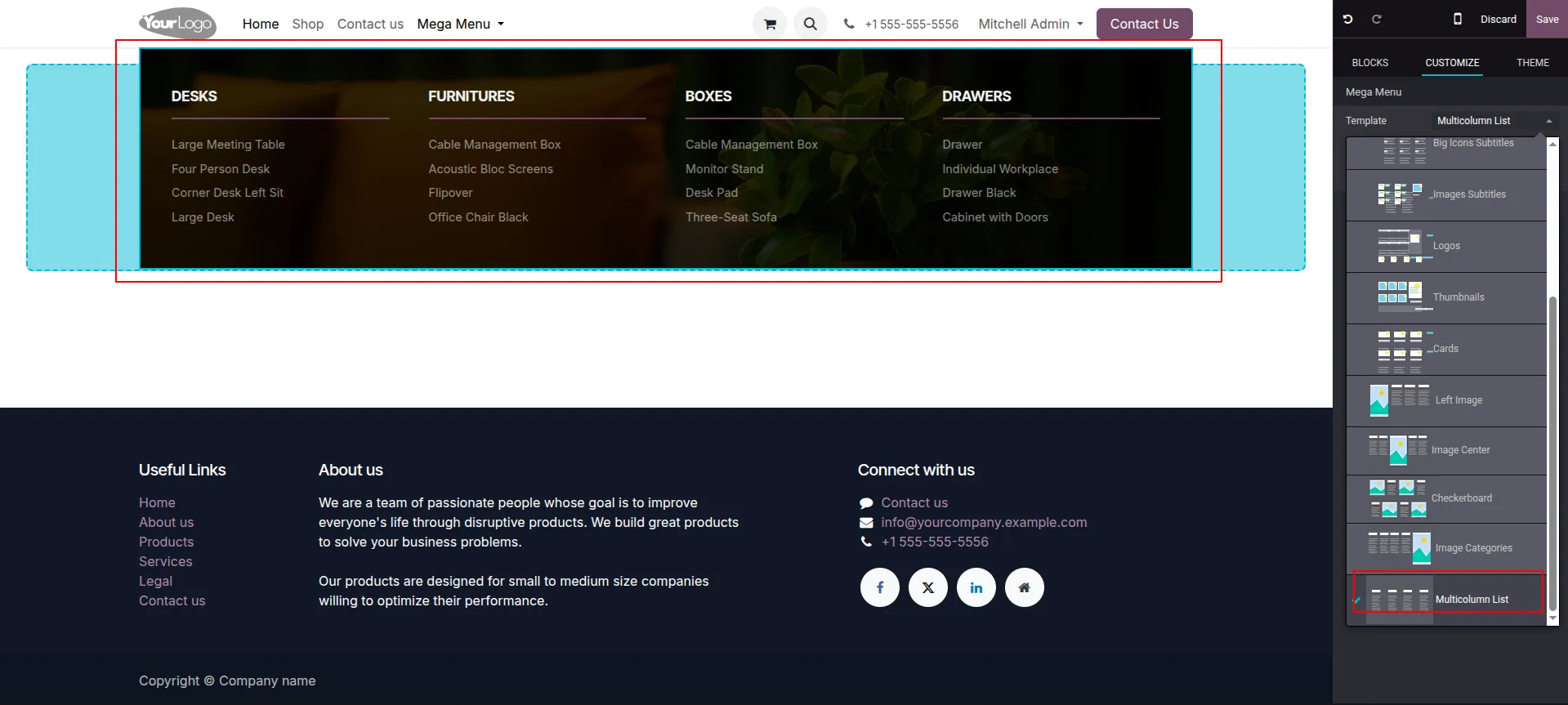
5.Access Edit mode, click your Mega Menu, and choose the Multicolumn List template to apply a sleek, dark-themed layout that supports a custom background image behind your products.
Our solutions focus on your problems
- Odoo Implementation
- Odoo Customization
- ERP Development and Implementation
- Odoo Ipass Cloud
- AI for Odoo
- Odoo Apps
- Aws Marketplace Products
- Business Engines
Our Pricing includes User Manual, 90 Days Support (Monday-Friday 10am to 7pm IST) and One time Setup
• Works & tested on standard installations of Odoo with no third party apps,
• Free support only for odoo installations with no third party apps,
• Paid support available for Odoo installations with third party apps.

Prefortune is a Odoo Official Partner, Odoo Development company. Our philosophy is to use Open Source tools and technologies to provide cost effective and green solutions for our customers.
Prefortune Technologies LLP is working on web development, Mobile development, and Odoo ERP.
If you need any help or want more additional features, you may contact us through:
Alternative Products
These other products might interest you
Specifications
| Version | 19.0, 18.0, 17.0, 16.0, 15.0, 14.0 |