Watch Quick Video
RFQ Comparison App for Odoo
RFQ Comparison App for Odoo
Odoo module which helps to evaluate multiple Requests for Quotation (RFQs) and Purchase Orders
through a clear side by side comparison report. The module enables purchasing teams to compare
vendors, products, quantities, unit prices, subtotals and totals in a single, well-structured
view, helping them to make faster and more informed procurement decisions. It automatically
splits large comparisons into several tables for better readability and supports smooth export
to HTML, PDF and Excel formats retaining a professional report layout. The module also supports
multi-company environments and automatically shows the company currency so you can accurately
and consistently compare one company to another.
RFQ Quotation Comparison App for Odoo Features
- Compare multiple RFQs or Purchase Orders with each other in one report for better supplier evaluation.
- Export the comparison report in HTML, PDF and Excel format with a clean and professional layout.
- Automatically groups RFQs into several comparison tables for better readability in PDF and HTML reports.
- See and compare vendors, products, quantities, unit prices, sub-totals and totals for all selected RFQs in a single location.
Complete Workflow for RFQ Comparison App for Odoo
The RFQ Quotation Comparison App for Odoo module makes the purchasing process easy to use by allowing users to compare multiple Requests for Quotation (RFQ) or Purchase Orders on one well organized report. Users simply select two or more RFQs from the Purchase module and generate a comparison report with vendors, products, quantities, unit prices, subtotals and totals side by side. Large selections are automatically broken up into multiple comparison tables, keeping the HTML and PDF reports clean and readable. This report is exportable to HTML, PDF and Excel, supports multi company environments and automatically displays the right company currency, helping purchasing teams to evaluate supplier (RFQ) quotations efficiently and make accurate purchasing decisions.
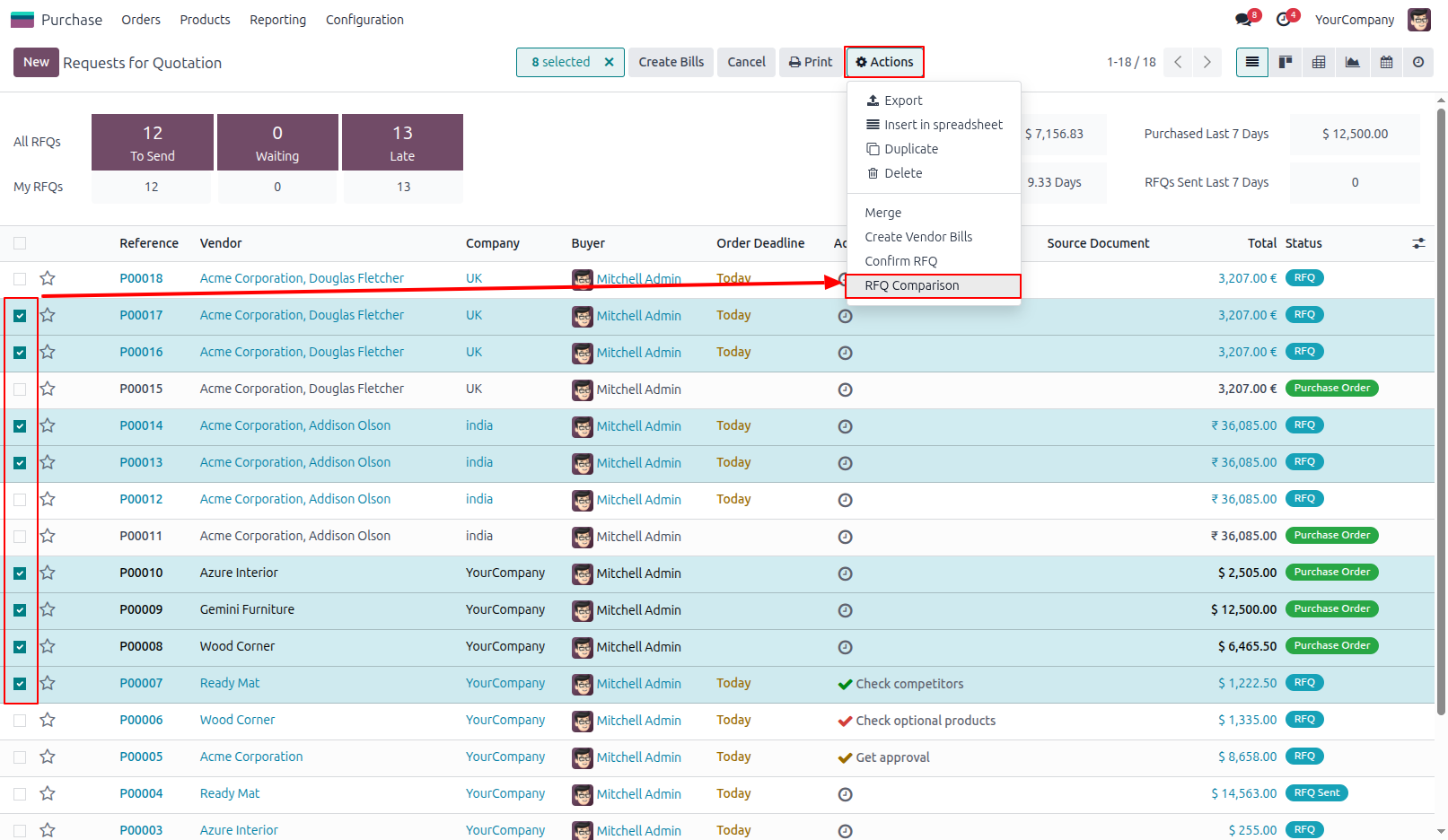
1.Go to the Requests for Quotation menu in the Purchase module. Select two or more RFQs that you want to compare. From the Action menu, click RFQ Comparison to generate the comparison report.
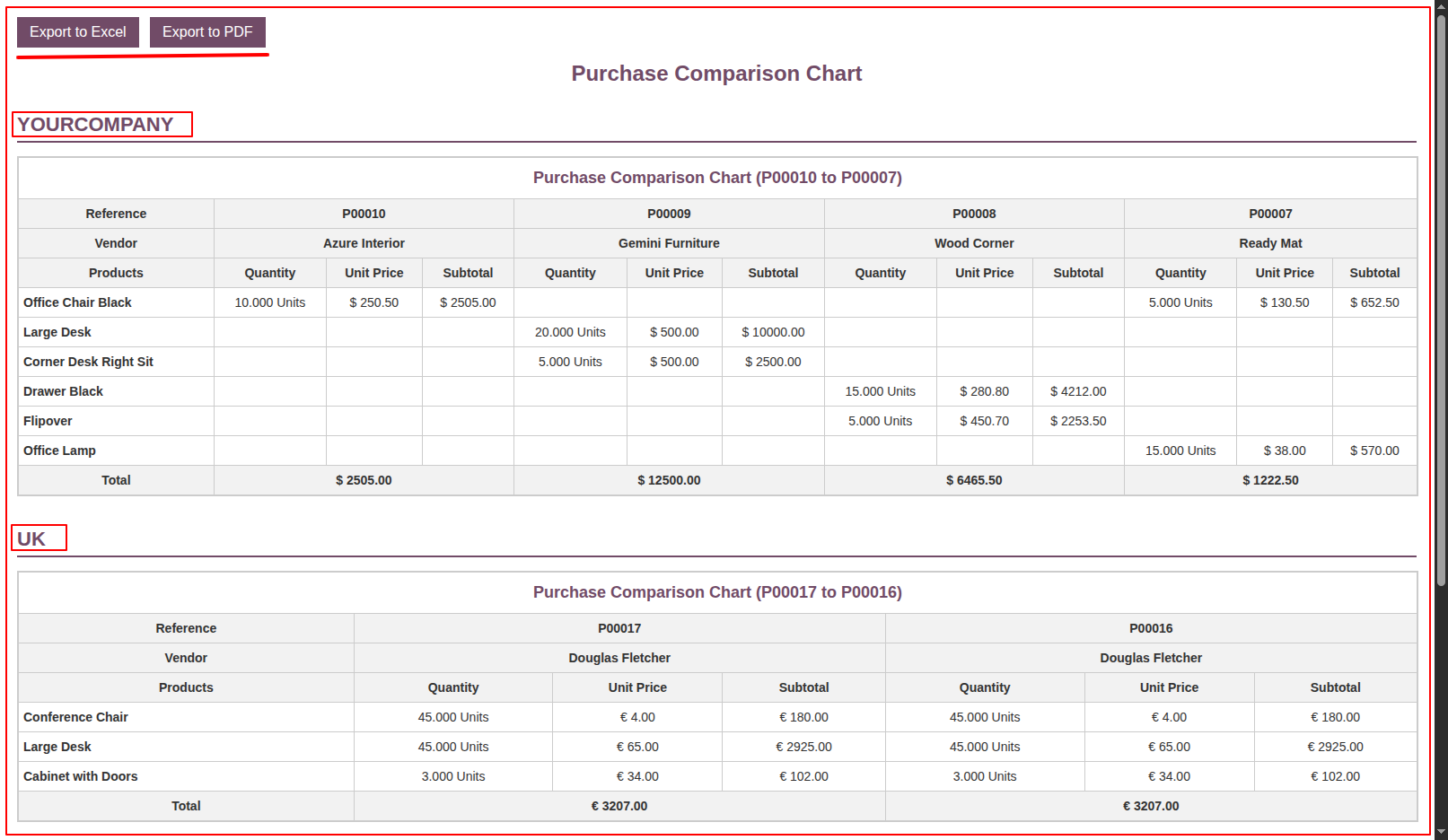
2.HTML View of Purchase Comparison Chart A detailed HTML view of the Purchase Comparison Chart opens in a new browser tab, allowing you to review and compare the selected RFQs before exporting the report.
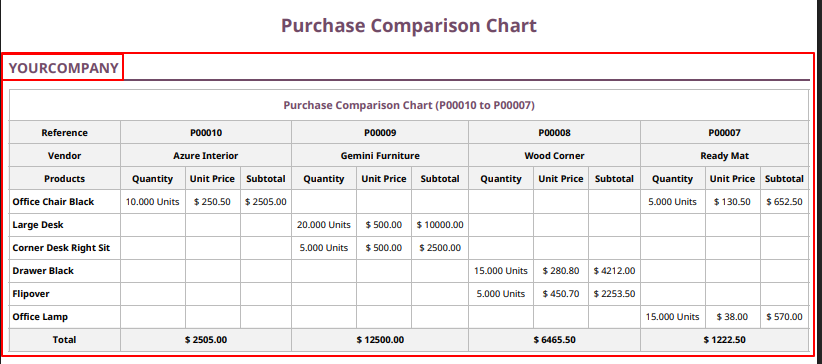
3.PDF View of Purchase Comparison Chart Click the Export to PDF button to generate and open the Purchase Comparison Chart in PDF format. ( Each New Company Starts on a New PDF Page )
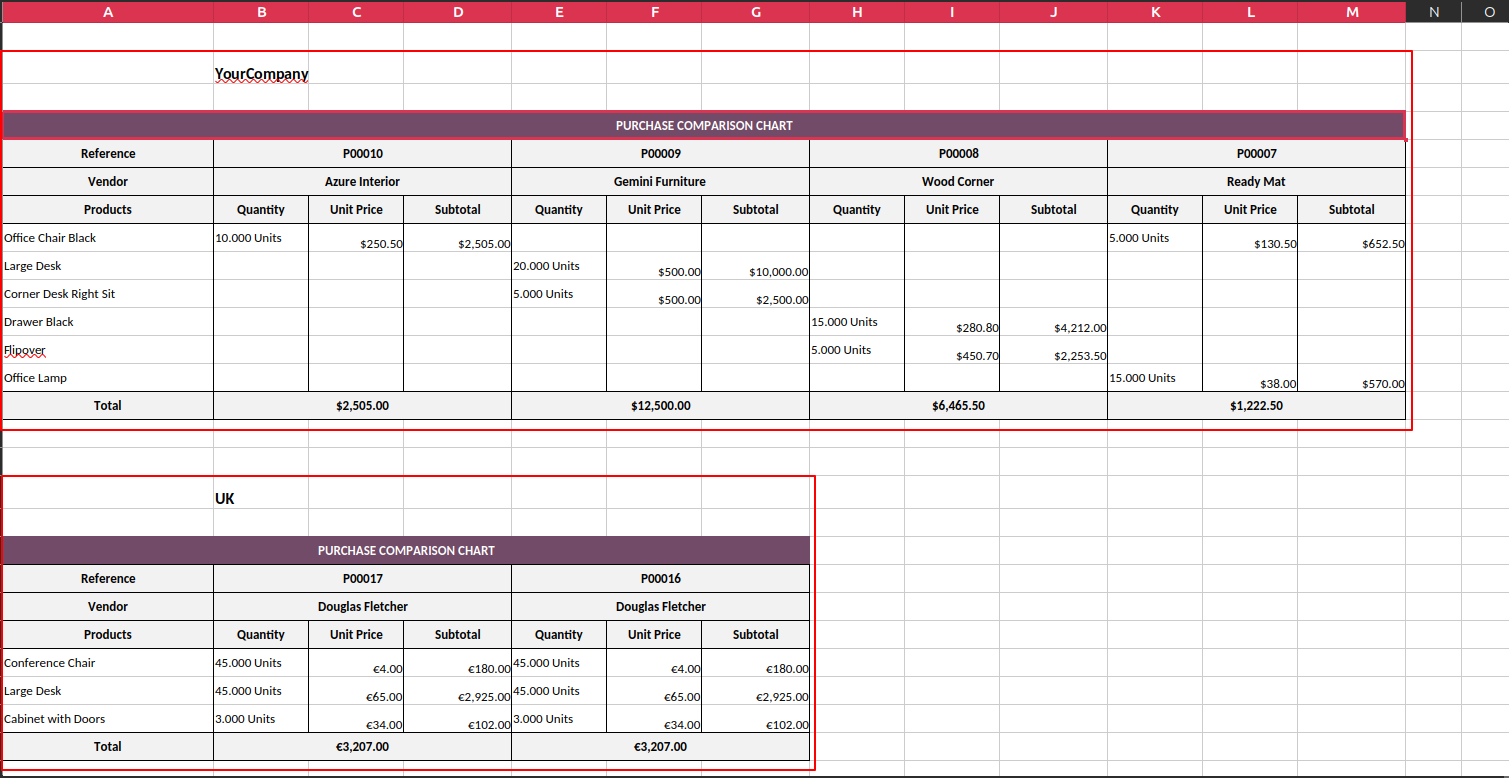
4.Excel View of Purchase Comparison Chart Click the Export to Excel button to generate and open the Purchase Comparison Chart in Microsoft Excel format.(Each Company Has Its Own Separate Table in Excel)
Our solutions focus on your problems
- Odoo Implementation
- Odoo Customization
- ERP Development and Implementation
- Odoo Ipass Cloud
- AI for Odoo
- Odoo Apps
- Aws Marketplace Products
- Business Engines
Our Pricing includes User Manual, 90 Days Support (Monday-Friday 10am to 7pm IST) and One time Setup
• Works & tested on standard installations of Odoo with no third party apps,
• Free support only for odoo installations with no third party apps,
• Paid support available for Odoo installations with third party apps.

Prefortune is a Odoo Official Partner, Odoo Development company. Our philosophy is to use Open Source tools and technologies to provide cost effective and green solutions for our customers.
Prefortune Technologies LLP is working on web development, Mobile development, and Odoo ERP.
If you need any help or want more additional features, you may contact us through:
Alternative Products
These other products might interest you
Specifications
| Version | 19.0, 18.0, 17.0, 16.0, 15.0, 14.0 |