Watch Quick Video
POS Validator for Customers
Our efficient
POS Validator for Customers
module is designed to improve Point of Sale processes by making sure that customer information is captured
as per business requirements. The function enables admins to turn on or off mandatory customer choice
directly from POS configuration. With this option on, cashiers will not be able to validate a POS order
without assigning a customer. It helps firms keep accurate sales records and track their customers. When
the order is created the customer criteria status is saved so that if the POS configuration changes down
the road current open orders will still follow the first validation rules. New setup updates are applied
to new orders only, maintaining a consistent and dependable workflow. The application is 100% compatible
with Odoo POS and offers better accuracy in payments and less operational mistakes. It is simple to
implement and can be used by retail stores, grocery stores, restaurants, and companies with POS
transactions linked to customers.
It provides intelligent features to improve POS order management:
1. Flexible Customer Requirement Configuration: Enable or disable mandatory customer selection
from the POS settings. The selected setup will be installed automatically on new created POS orders.
2. Validation of Customers. Popup: If a consumer choice is required, the system will not
verify the order without selecting a customer and will show an alert popup to help the customer.
3. Order based validation logic: Each one POS order has customer required status at the time
of order generation. Even if you modify the setup later, existing orders will still use the primary rule.
4. Smart Configuration Handling: Changes to the customer requirement setting affect only newly
created POS orders. This ensures consistent actions for pending orders and avoids unusual validation
issues.
5. Accurate Customer Tracking: The feature boosts sales monitoring, data accuracy and
management of customers on POS transactions by enforced customer assigned tasks when necessary.
POS Validator for Customers
- Enable or disable mandatory customer selection directly from the POS configuration settings. The preferred option is immediately given to the new POS orders.
- When customer selection is required, users cannot complete the payment without assigning a customer. A warning pop-up asks the cashier to select the customer before verifying.
- Each POS order stores the customer requirement status at the time of its creation. When you change the settings, current orders remain according to their original approval rule.
- Changes to the 'Is Customer Required' setting affect only newly created POS orders. This offers a consistent behaviour for order pending and prevents unforeseen checking issues.
Complete Workflow for POS Mandatory Customer Odoo App
Enable the POS Mandatory Customer option to enforce customer selection during POS checkout. The system applies the Customer Required Rule to new orders and displays a Validation Warning Popup if no customer is selected. Each order stores its original setting, ensuring Existing Orders and New Orders follow the correct validation behavior for a consistent POS workflow.
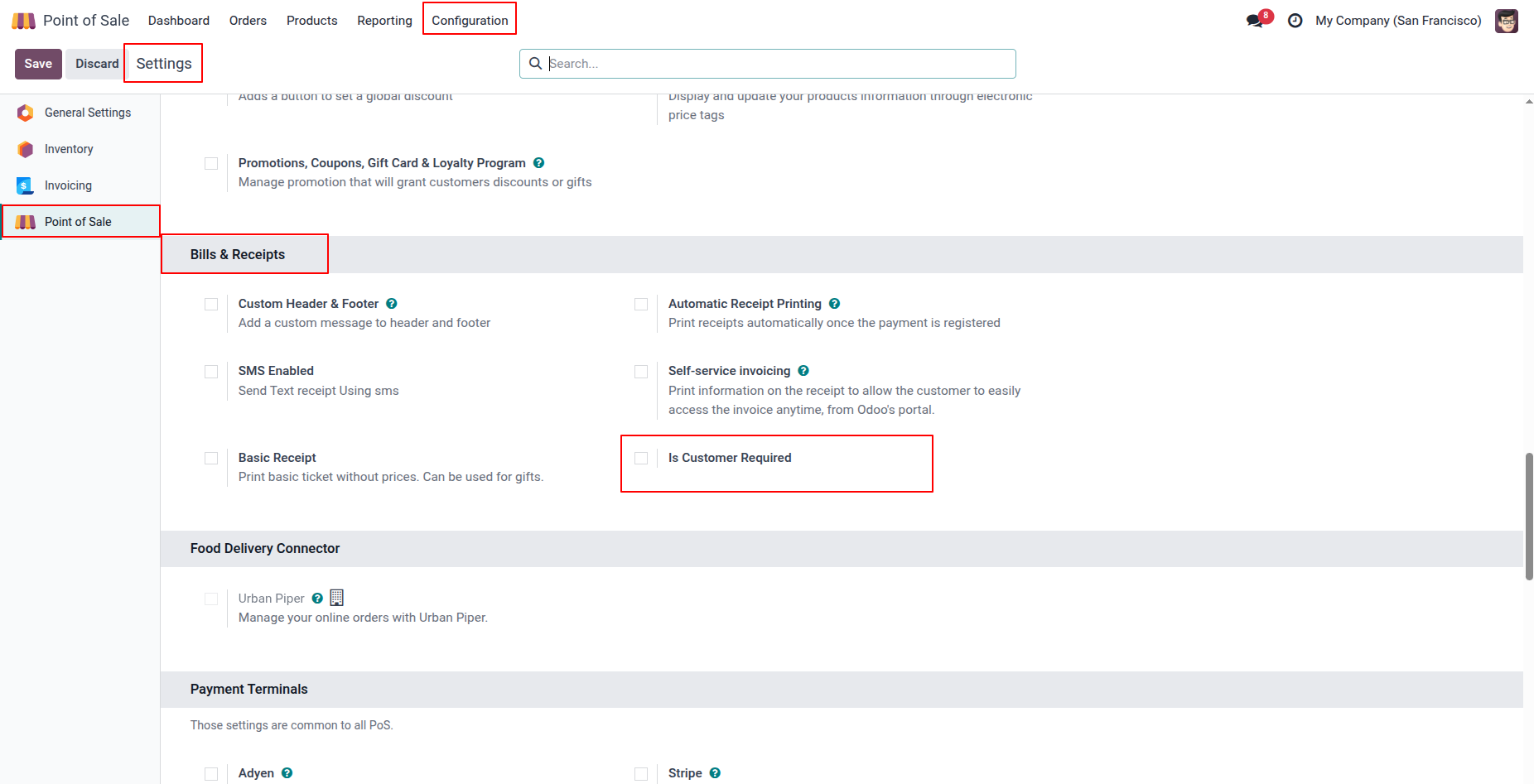
1. Enable the 'Is Customer Required' checkbox from: Point of Sale → Configuration → Point of Sale → Bills & Receipts
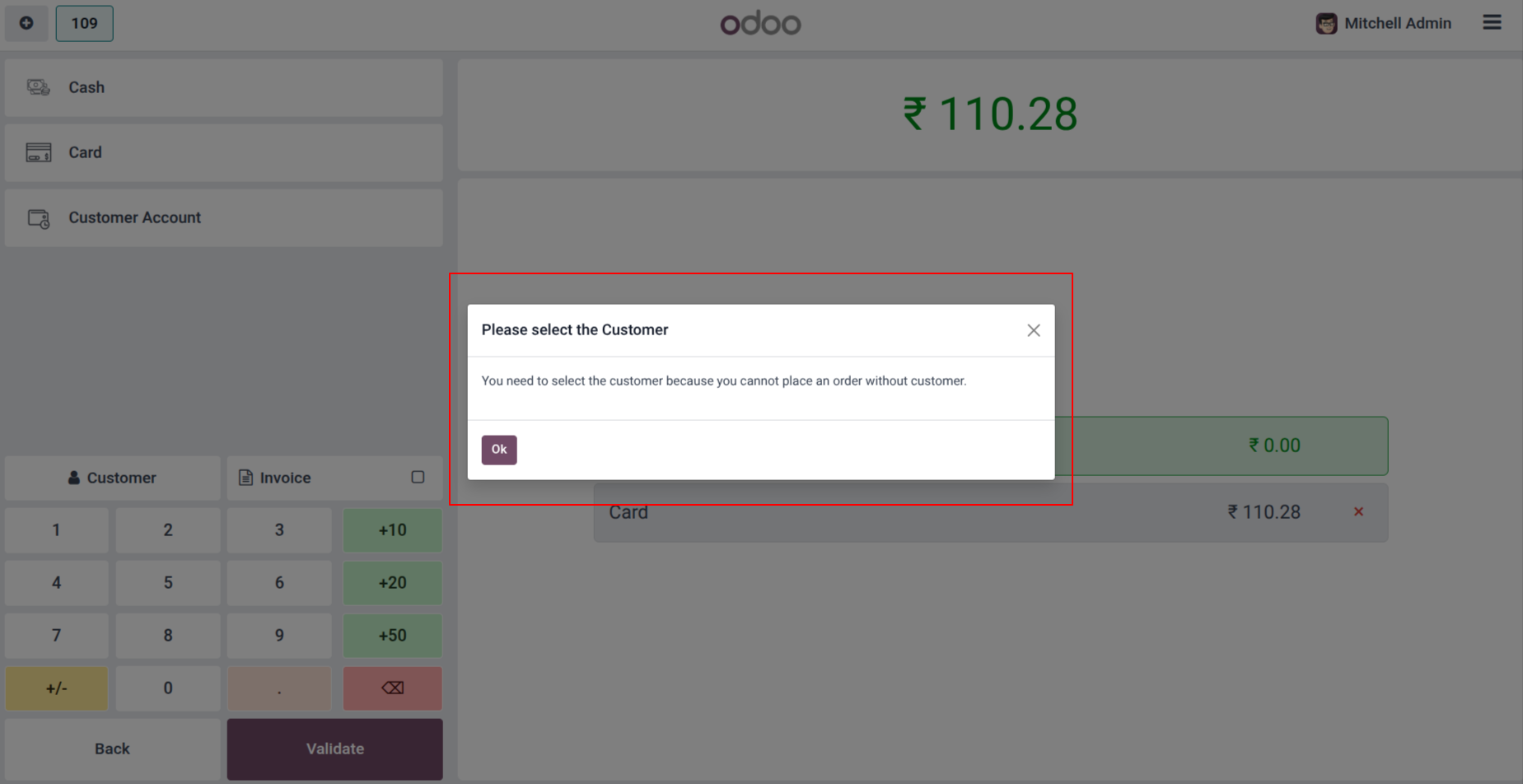
2. If the user attempts to validate a POS order without selecting a customer, the system will display a warning popup. This validation ensures that every POS transaction is linked to a customer for accurate tracking and reporting.
Our solutions focus on your problems
- Odoo Implementation
- Odoo Customization
- ERP Development and Implementation
- Odoo Ipass Cloud
- AI for Odoo
- Odoo Apps
- Aws Marketplace Products
- Business Engines
Our Pricing includes User Manual, 90 Days Support (Monday-Friday 10am to 7pm IST) and One time Setup
• Works & tested on standard installations of Odoo with no third party apps,
• Free support only for odoo installations with no third party apps,
• Paid support available for Odoo installations with third party apps.

Prefortune is a Odoo Official Partner, Odoo Development company. Our philosophy is to use Open Source tools and technologies to provide cost effective and green solutions for our customers.
Prefortune Technologies LLP is working on web development, Mobile development, and Odoo ERP.
If you need any help or want more additional features, you may contact us through:
Alternative Products
These other products might interest you
Specifications
| Version | 19.0, 18.0, 17.0, 16.0, 15.0, 14.0 |