Watch Quick Video
One Page Checkout Odoo App
Our module
One Page Checkout Odoo App
is designed to speed up, make easier and more convenient the Odoo eCommerce checkout process for your
customers. The module makes the checkout to one page so that your customers can checkout without being
redirected to different checkout pages. The customer can control their billing and shipping information,
select delivery methods and payment options and review their order summary from one simple-to-use
interface. This module provides a clean, organised checkout format that makes buying easier and removes
unnecessary navigation. This means that customers can get their orders done successfully which results in
an easy and customer friendly shopping experience. This solution is especially helpful for eCommerce
websites, online stores, retailers, wholesalers, distributors and organisations that wish to automate
their online buying process.
The One Page Checkout Odoo App is easy to manage and has strong features:
1. One Page Checkout: Customers don’t need to go through several checkout steps as they can do
the entire process of checkout from one page. “It’s faster and easier to buy.
2. Customer & Address Management: On the checkout page the customer can add/edit the billing
and shipping information. You can edit or view your address details at checkout without leaving.
3. Delivery Method Selection: Delivery method options can be displayed in the one page
checkout window. You can choose your preferred shipping method for your order at checkout.
4. Choose Payment Method: The customer will be able to choose one from the list of available
payment methods on the same checkout page. Now you can easily and simple make payments with this.
5. Order Summary & Review: The checkout page shows important order information such as the
products, quantities, prices, taxes, discounts and total amounts. The order details are shown to the
customer before the purchase is confirmed.
6. Easy & Fast Checkout: The module makes checkout easier and less time-consuming for the
customer during page navigation. The fast and easy checkout process makes it simple for customers to shop
online.
One Page Checkout Odoo App features
- Your customers will love the simplified checkout process that can be completed in one page, instead of multiple checkout steps. It makes it quicker and easier to order.
- Checkout page shows billing and shipping details. The user can fill and check the information he needs without leaving the page.
- A single checkout experience that supports all delivery methods and payment options. Customers can easily choose the delivery and payment method they want.
- Checkout can be separated into different sections in an accordion layout. Customers can easily expand the required part and view / modify the data.
- This module removes steps not needed for customer navigation and checkout process. This can help to lower cart abandonment and improve the shopping experience.
Complete Workflow for One Page Checkout Odoo App
The customer visits the Website and adds the required products to the shopping cart before proceeding to the One Page Checkout. On the checkout page, the customer can enter or update the required Billing & Shipping Details, select the preferred Delivery Method and Payment Method, and review the Order Summary. After verifying all the required information, the customer can confirm the order directly from the same checkout page without navigating through multiple checkout steps.
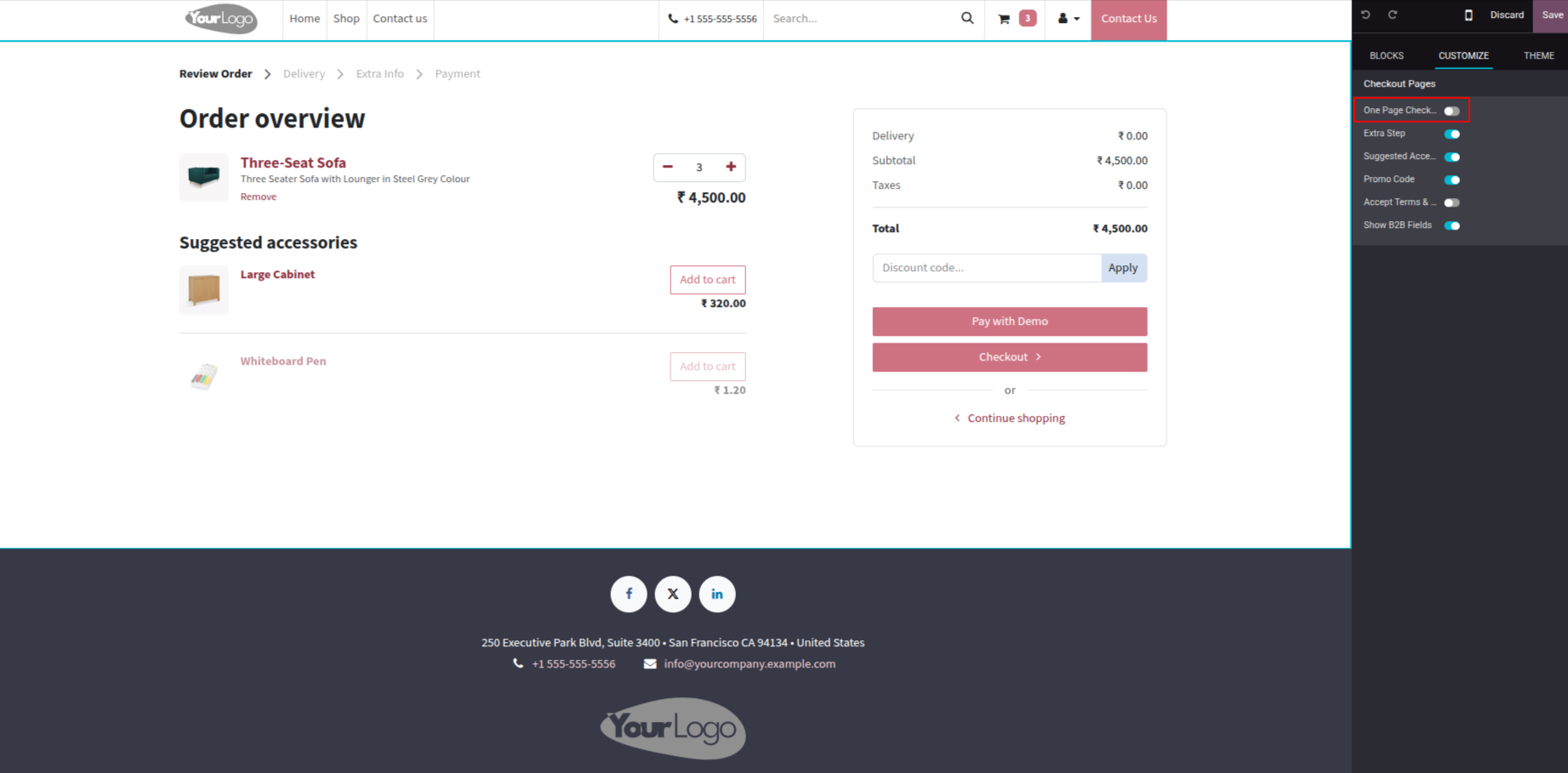
1. Navigate to the website and go to the Cart page. In the Customize panel on the right side, under Checkout Pages, enable the One Page Checkout toggle to activate the one page checkout experience.
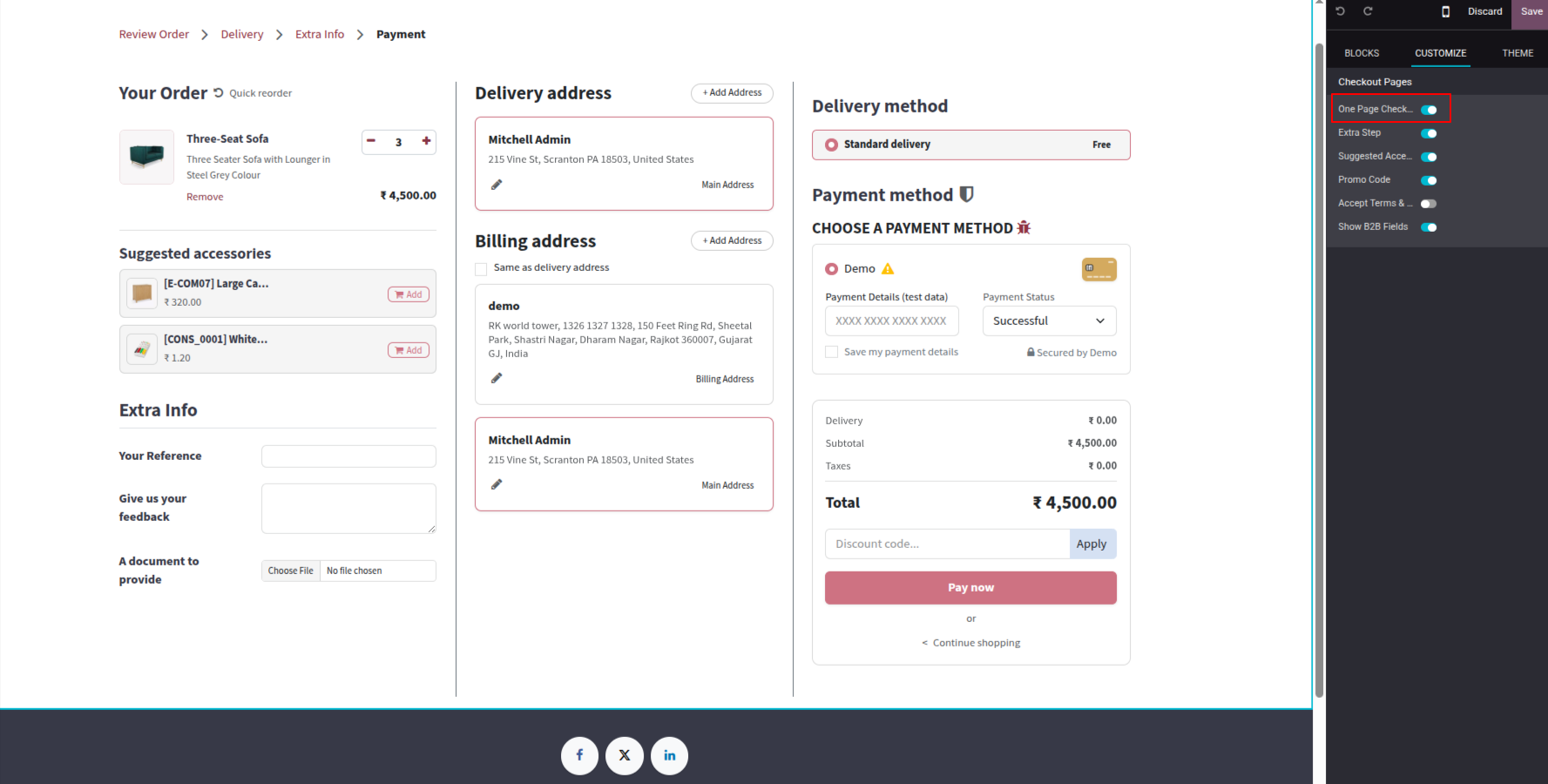
2. Once One Page Checkout is enabled, the complete checkout experience is displayed on a single page. The page shows Your Order summary on the left, Delivery Address and Billing Address in the middle, and Delivery Method and Payment Method on the right. Customers can choose Standard Delivery and pay using the available payment options all from one unified checkout page.
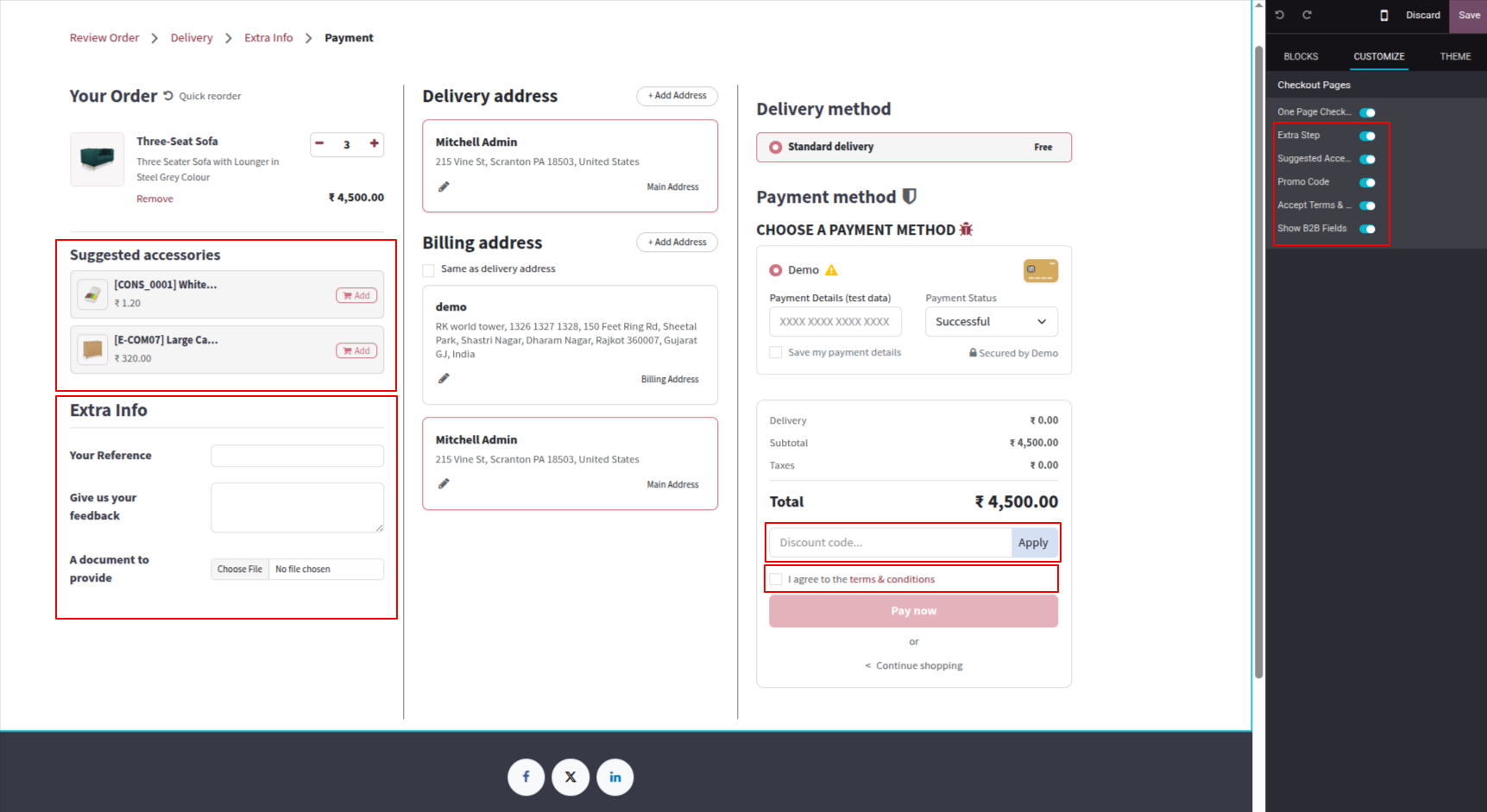
3. With all additional options enabled in the Customize panel — including Extra Step, Suggested Accessories, Promo Code, Accept Terms & Conditions, and Show B2B Fields — the one page checkout displays extra sections such as Suggested Accessories, Extra Info fields (Your Reference, Feedback, Document), a Discount Code field, and the Terms & conditions checkbox alongside the Delivery and Payment method sections.
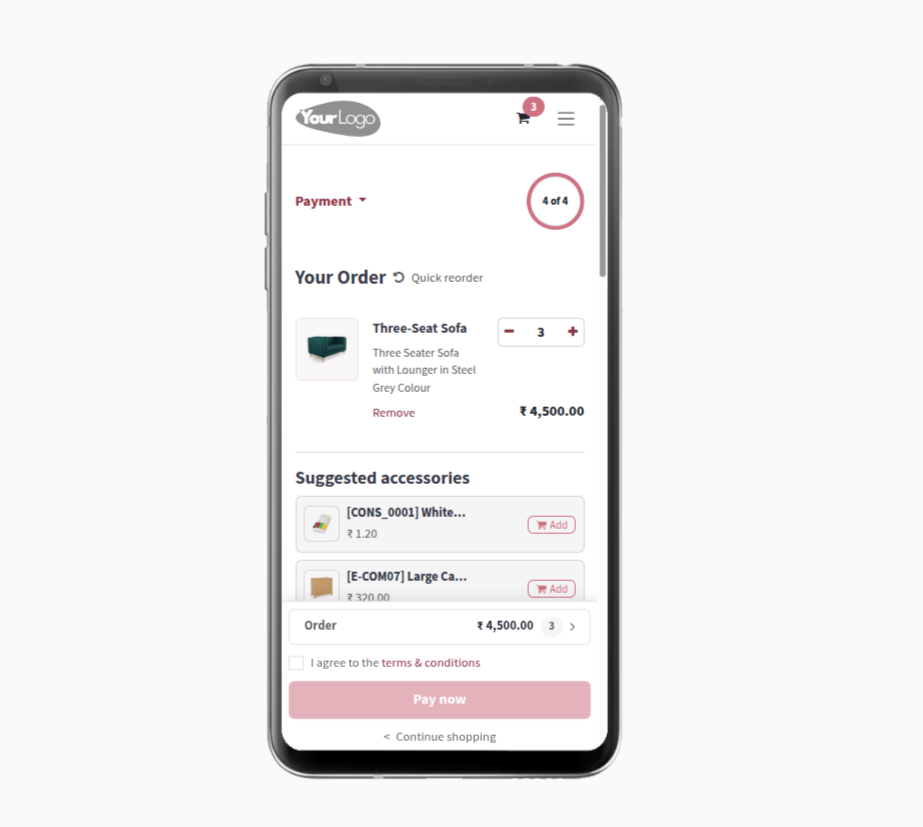
4. On Mobile, the One Page Checkout adapts perfectly to smaller screens. The order summary section shows the product list with quantity controls, Suggested Accessories providing a smooth mobile checkout experience showing step.
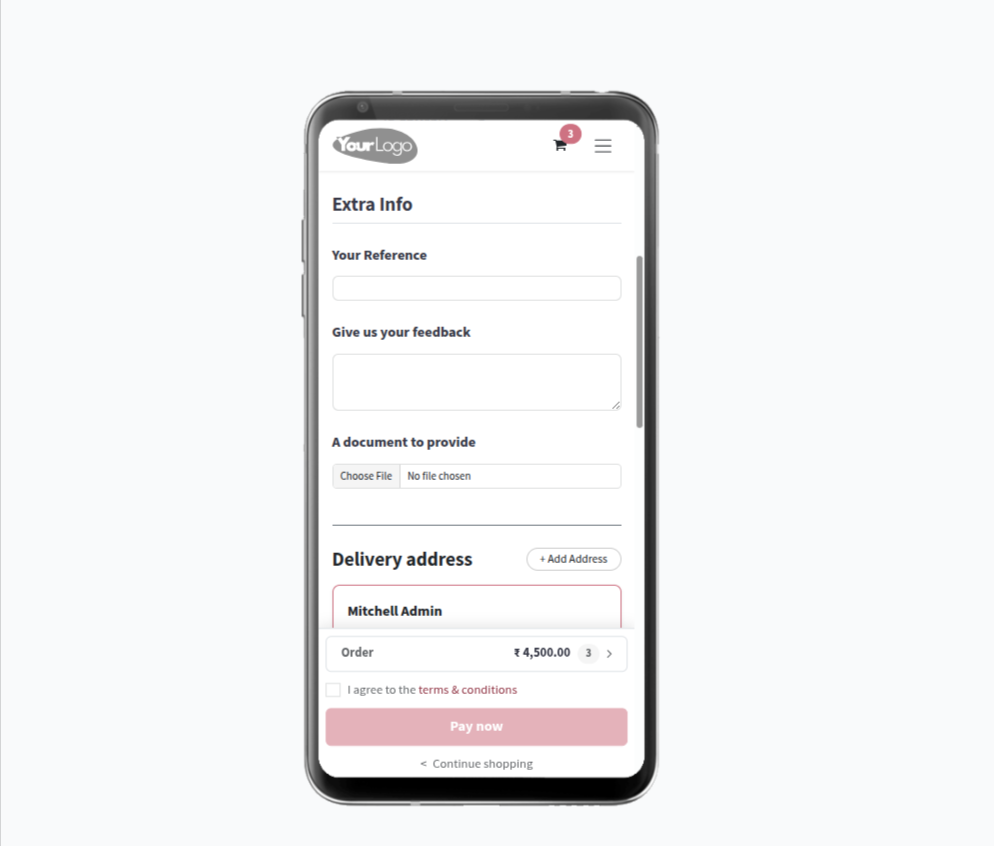
5. On Mobile, the Extra Info section is clearly displayed with fields for Your Reference, Give us your feedback, and A document to provide. all accessible without leaving the checkout page.
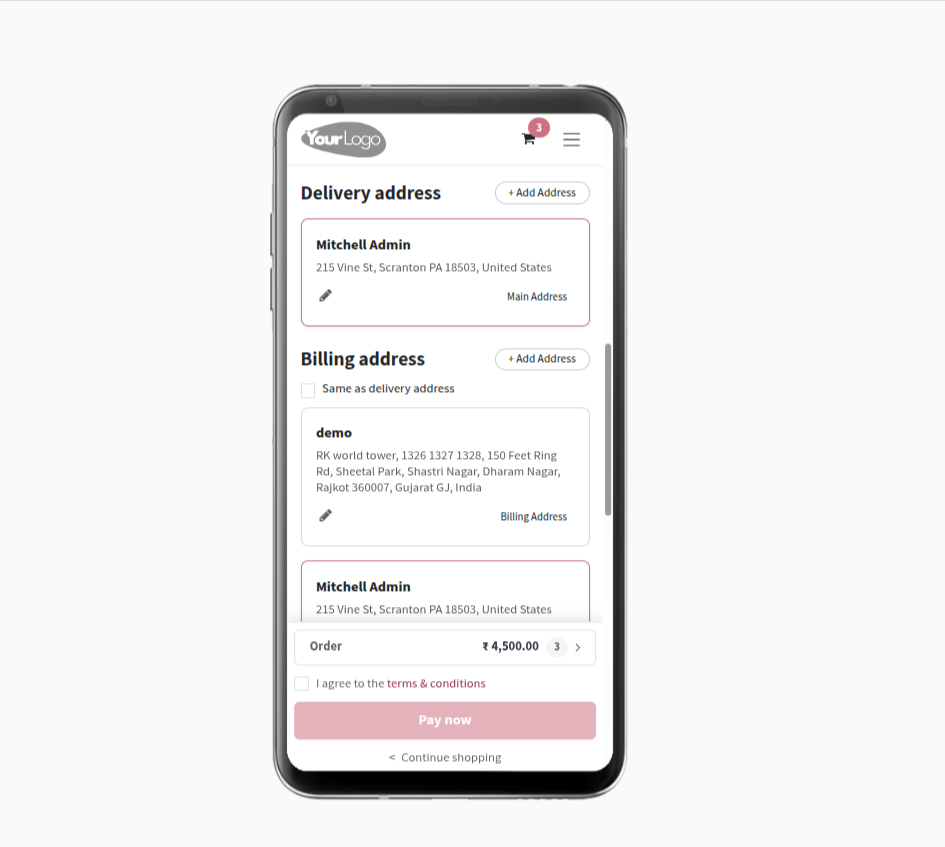
6. On Mobile, the Delivery Address and Billing Address sections are shown with address cards displaying customer name and full address. Customers can edit or add a new address directly on the checkout page. The billing address can be set as same as delivery address using the checkbox option.
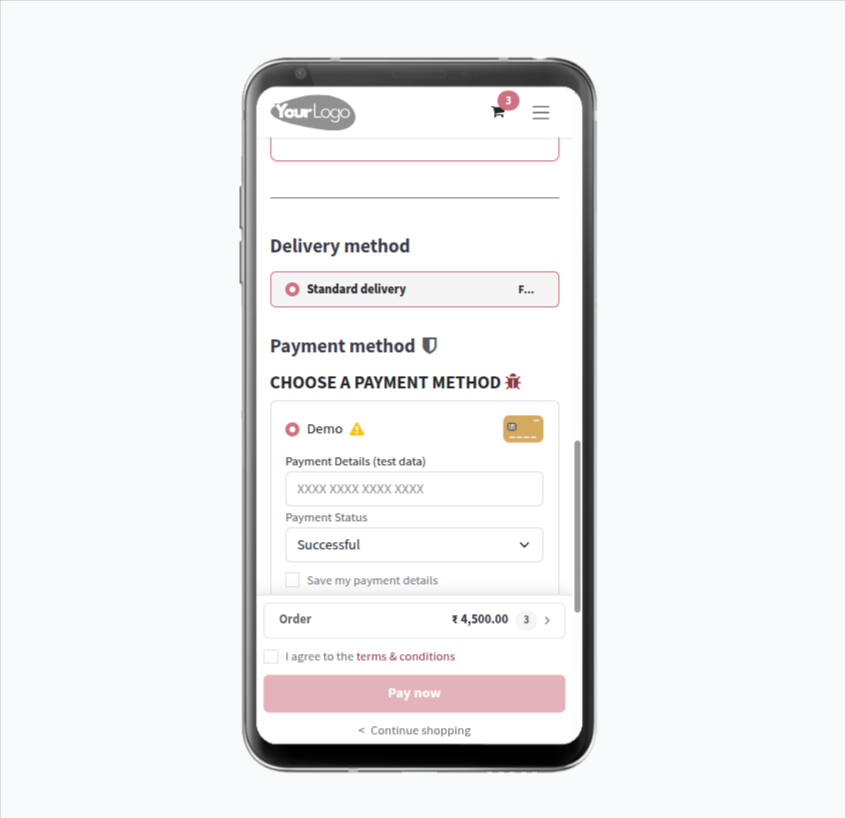
7. On Mobile, the Delivery Method section allows customers to select their preferred shipping method (e.g., Standard Delivery — Free). The Payment Method section lets customers choose a payment option and enter payment details (card number, payment status) all from one scrollable checkout screen.
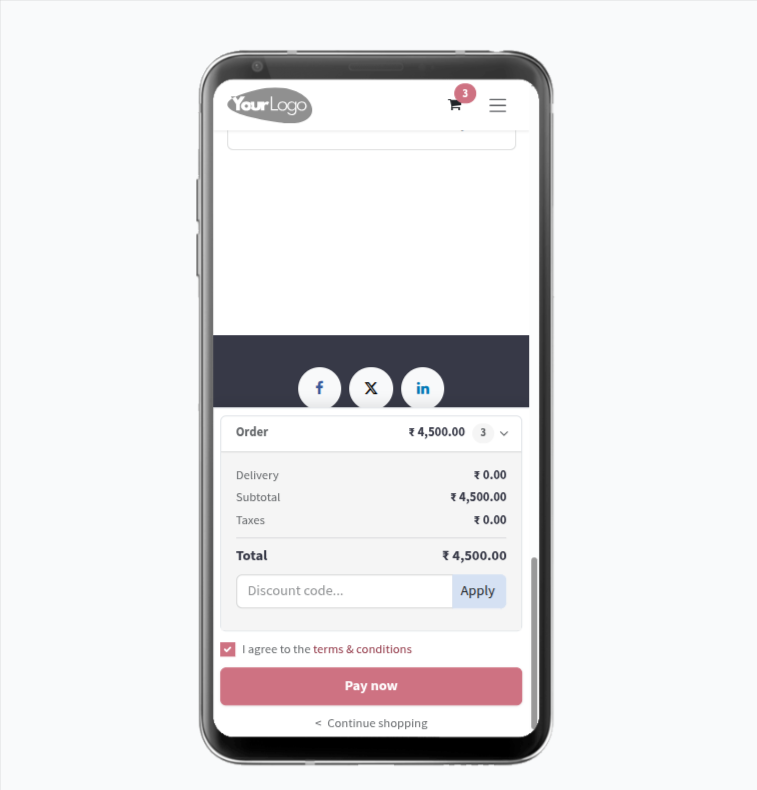
8. On Mobile, the expandable Order summary panel at the bottom displays the full breakdown: Delivery, Subtotal, Taxes, and Total amount. A Discount code field with an Apply button is also available. Once the customer checks the Terms & Conditions checkbox, the Pay now button becomes active to complete the purchase.
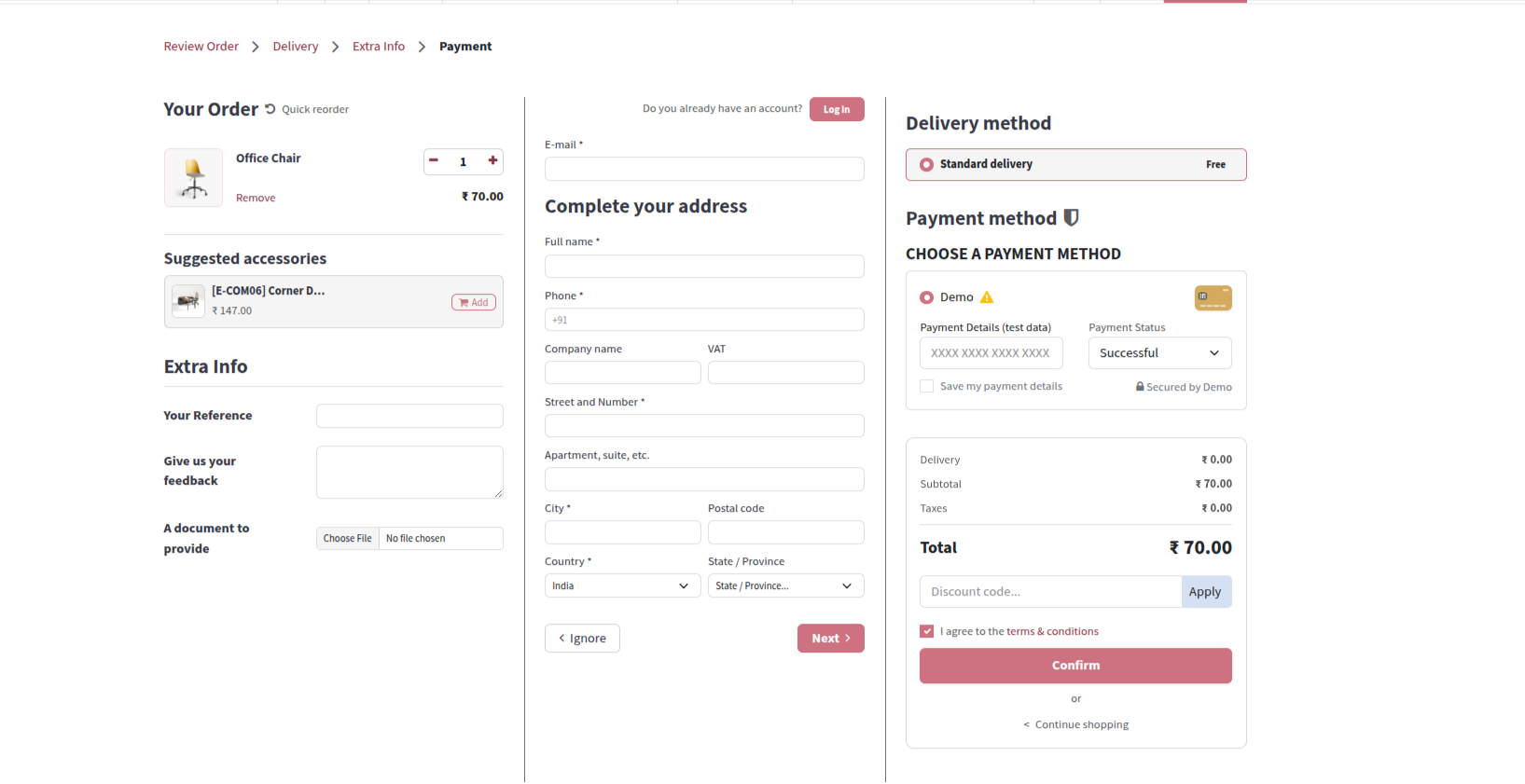
9. For Guest Checkout, the One Page Checkout displays a Complete your address form where new customers can enter their Email, Full name, Phone, Company name, VAT, Street and Number, Apartment, City, Postal code, Country, and State/Province — with a Log In option for existing accounts. The delivery method and payment method are also visible on the same page with the order summary.
Our solutions focus on your problems
- Odoo Implementation
- Odoo Customization
- ERP Development and Implementation
- Odoo Ipass Cloud
- AI for Odoo
- Odoo Apps
- Aws Marketplace Products
- Business Engines
Our Pricing includes User Manual, 90 Days Support (Monday-Friday 10am to 7pm IST) and One time Setup
• Works & tested on standard installations of Odoo with no third party apps,
• Free support only for odoo installations with no third party apps,
• Paid support available for Odoo installations with third party apps.

Prefortune is a Odoo Official Partner, Odoo Development company. Our philosophy is to use Open Source tools and technologies to provide cost effective and green solutions for our customers.
Prefortune Technologies LLP is working on web development, Mobile development, and Odoo ERP.
If you need any help or want more additional features, you may contact us through:
Alternative Products
These other products might interest you
Specifications
| Version | 20.0, 19.0, 18.0, 17.0, 16.0, 15.0, 14.0 |