Watch Quick Video
Odoo Quick Chat App from List View
Odoo Quick Chat App
is a fast and efficient app that allows you to use the chatter and users to communicate with each other from list views. The module offers a good way for users to work with messages and activities without having to switch back and forth between list and form views. Standard Odoo workflows are in the system. The system gives better operational control and visibility.
1. Quick Access Icon: Adds automatically a chat icon to the list views of mail.thread models.
2. Modal Chatter: Brings up the full chatter interface in a handy popup modal.
3. Perfect Integration: Perfect integration with the Odoo web client and view architecture.
It ensures increased productivity, precision and smooth communication operation
Odoo Quick Chat App from List View
- Quick Access & Communication Tools – Add a chat icon to the list view of all supported models to easily access communication tools.
- Modal Interface - Click the icon and a modal opens up with the full chatter saving time and page reloads.
- Universal Support - Works with any Odoo model inheriting from mail.thread That means you have a consistent experience across the platform.
Complete Workflow for Odoo Quick Chat App from List View
To use the Quick Chat App from List View feature, simply navigate to any list (tree) view in Odoo for a model that supports messaging (inherits from mail.thread), such as Sales, Invoicing, or CRM. You will notice a new Chatter Icon next to each record in the list. Click on this icon to instantly open a modal window containing the full chatter interface for that specific record. From this modal, you can send messages, log notes, and schedule activities just as you would on the form view, all without ever leaving the list view.
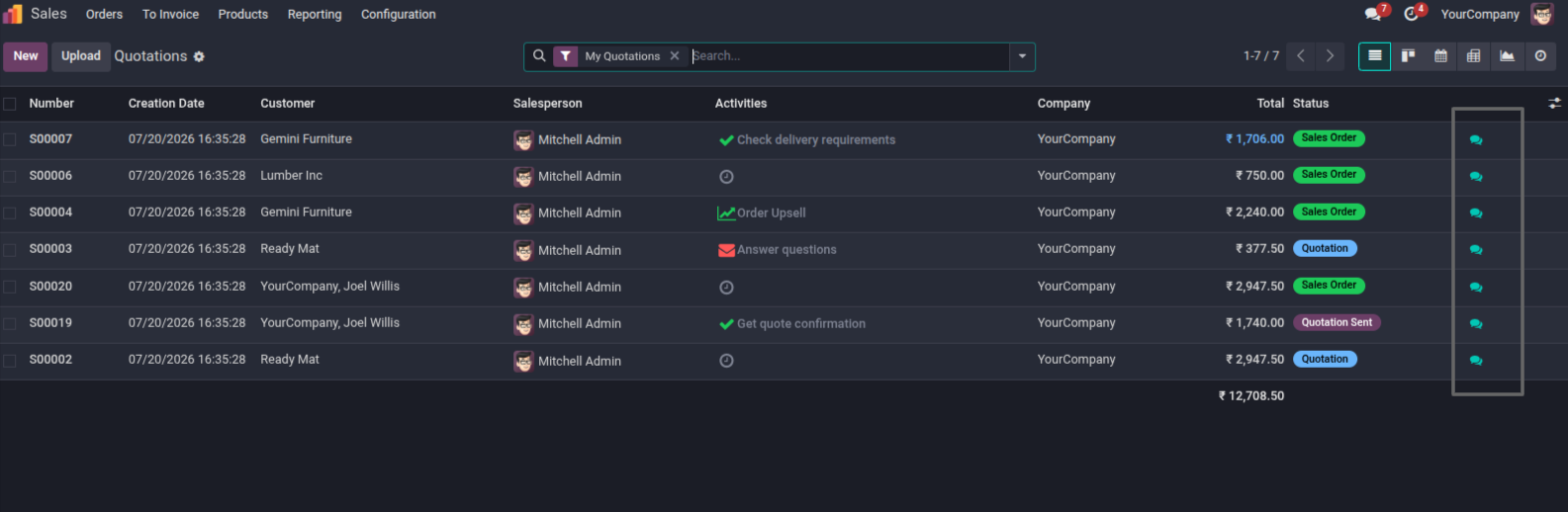
1. A chat icon is automatically injected into the list view.
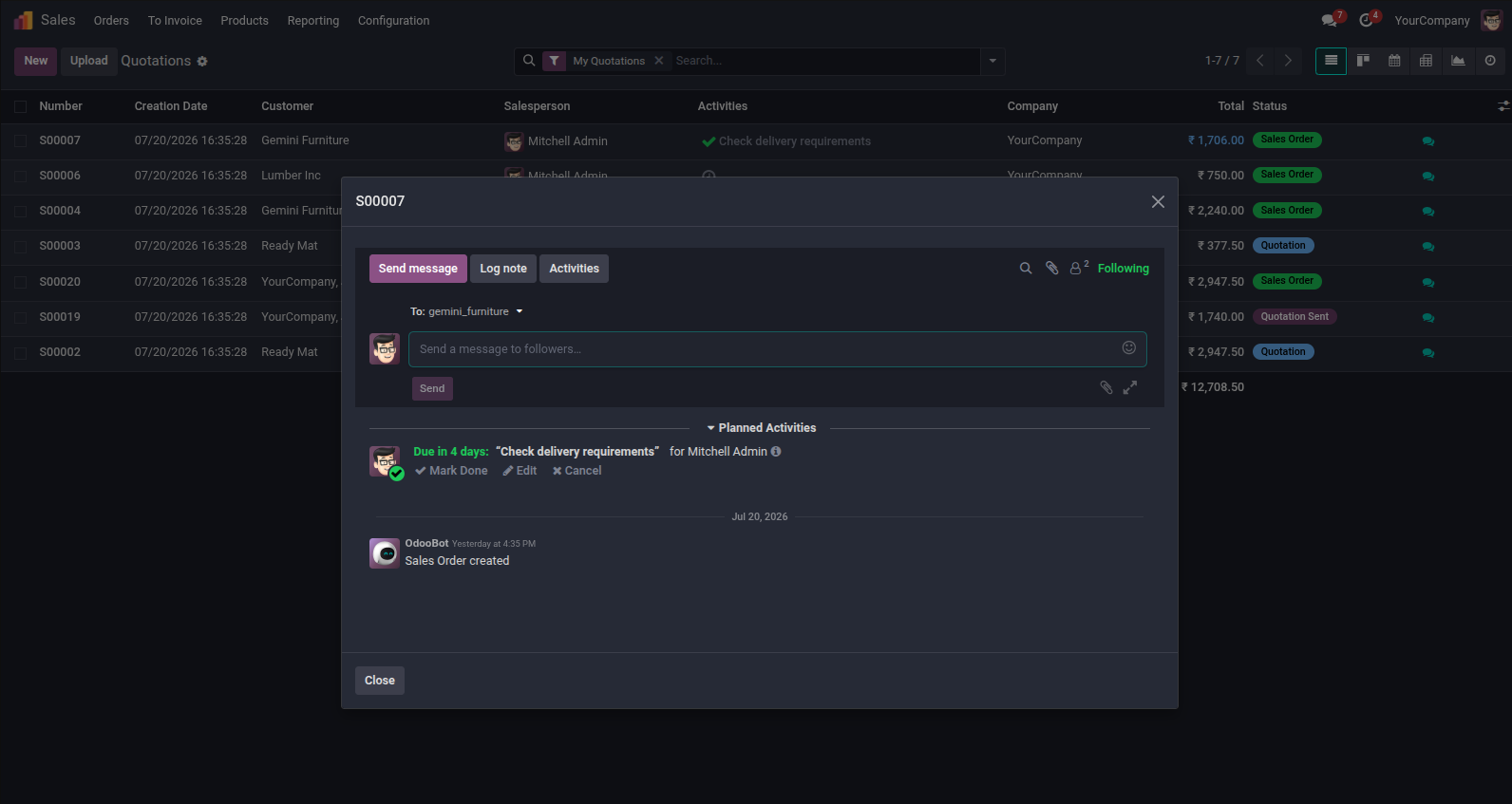
2. Clicking the icon opens a modal containing the full chatter.
This module streamlines communication workflows by allowing you to access the record chatter directly from the list view. You can view messages, log internal notes, and schedule activities without navigating to the form view.
With a seamlessly integrated modal interface, it ensures a faster and more efficient user experience.
Our solutions focus on your problems
- Odoo Implementation
- Odoo Customization
- ERP Development and Implementation
- Odoo Ipass Cloud
- AI for Odoo
- Odoo Apps
- Aws Marketplace Products
- Business Engines
Our Pricing includes User Manual, 90 Days Support (Monday-Friday 10am to 7pm IST) and One time Setup
• Works & tested on standard installations of Odoo with no third party apps,
• Free support only for odoo installations with no third party apps,
• Paid support available for Odoo installations with third party apps.

Prefortune is a Odoo Official Partner, Odoo Development company. Our philosophy is to use Open Source tools and technologies to provide cost effective and green solutions for our customers.
Prefortune Technologies LLP is working on web development, Mobile development, and Odoo ERP.
If you need any help or want more additional features, you may contact us through:
Alternative Products
These other products might interest you
Specifications
| Version | 19.0, 18.0, 17.0, 16.0, 15.0, 14.0 |