Watch Quick Video
Comprehensive Go Shippo Integration Odoo App
Go shippo Shipping Integration Odoo App
is an enterprise-grade Odoo add-on that helps you to fully automate and optimise your fulfilment workflow. By securely connecting your Shippo API keys, your Odoo system will get immediate access to a massive logistics network: You will directly connect to 85+ global shipping providers across 40+ countries supported.
Get rid of manual data entry and operational bottlenecks. Natively support real-time rate fetching, multi-parcel packing, complex international customs declarations and instant label generation to ensure a frictionless, fast shipping experience straight from your ERP.
 United States
 Canada
 United Kingdom
 Australia
 Germany
 France
 Italy
Italy
 Spain
Spain
 Netherlands
 Belgium
 Switzerland
 Ireland
 Sweden
 Denmark
 Finland
 Portugal
 Austria
 Poland
 Czech Republic
 New Zealand
 Singapore
 Mexico
 India
India
 UAE
UAE
 Saudi Arabia
 Japan
Japan
 Malaysia
 Hong Kong
 South Africa
 Brazil
Extensive Feature Highlights
- Multi-Carrier Support: Easily connect with USPS, UPS, FedEx, DHL Express, Canada Post, DPD UK/DE, Evri, CouriersPlease LSO and other carriers.
- Live Shipping Rates & Margins: Exact shipping rates at checkout or manual quote. Ability to add fixed dollar margins or percentage markups to carrier rates to cover for packing and handling.
- Enhanced Label Printing: Ability to print various label types on delivery validation such as PDF 4x6, PDF 8.5x11, ZPLII (thermal printer) and PNG 4x6 Auto-label.
- International Shipping & Customs: Automated customs declarations, full support for cross border shipping. Set up Incoterms (DDU/DDP/FCA), EEL/PFC AES codes, Shipment Contents (Merchandise, Documents, Gifts) and assign a certifying signer.
- Custom Packaging & Multi-Parcel: Shippo’s auto-pulled User parcel templates. User can set mass units (lb, kg, oz, g) and distance units (in, cm, ft, m). User can dynamically pack orders into multiple parcels.
- Order Tracking & Cron Automation: Get tracking numbers and clickable links to track your orders right in the Odoo chatter. Services, packages, and statuses are automatically pulled in from Shippo with built-in scheduled Cron Job.
- Label Voiding & Refunds: Got it wrong? Voiding & Refunds of Labels Easily Void Unused Shipments & Get Refunds of Labels from the Odoo Delivery Order Screen.
- Extra Shipment Options: Set signature confirmations (standard, adult, certified, indirect), non-delivery options (return or abandon) and optionally bypass strict address validation to force label creation.
- Service Level & Account Targeting: Use Delivery Methods to target specific Shippo Carrier Accounts and Service Levels, restricting options or requiring specific shipping types.
Go Shippo Workflow

Enterprise-Grade Fulfillment Automation:
Our integration seamlessly embeds Shippo’s robust logistics engine directly into Odoo's native sales and inventory operations, providing a frictionless, end-to-end fulfillment experience.
1. Sales Order & Rating: The workflow begins at the quotation stage. Upon creating a Sale Order, Odoo dynamically communicates with Shippo to fetch accurate, real-time carrier rates based on product dimensions, weight, and targeted service levels, allowing you to seamlessly inject handling margins.
2. Validation & Customs: Once the order is confirmed, the warehouse prepares the Delivery Order. Odoo automates address validation and instantly processes international customs compliance (DDP/DDU/FCA) without manual data entry.
3. Label Generation & Export: Upon validating the Delivery Order, the system securely exports the shipment details to the shipping provider, instantly generating the required thermal (ZPLII) or standard (PDF) labels.
4. Bi-Directional Tracking & Synchronization: In real time, the shipment is created and the tracking URL is embedded within the Odoo Chatter. A built-in cron job ensures statuses are continually updated. Should a cancellation occur, seamless voiding and refund workflows are natively integrated, ensuring financial and operational consistency between Odoo and your Shippo Dashboard.
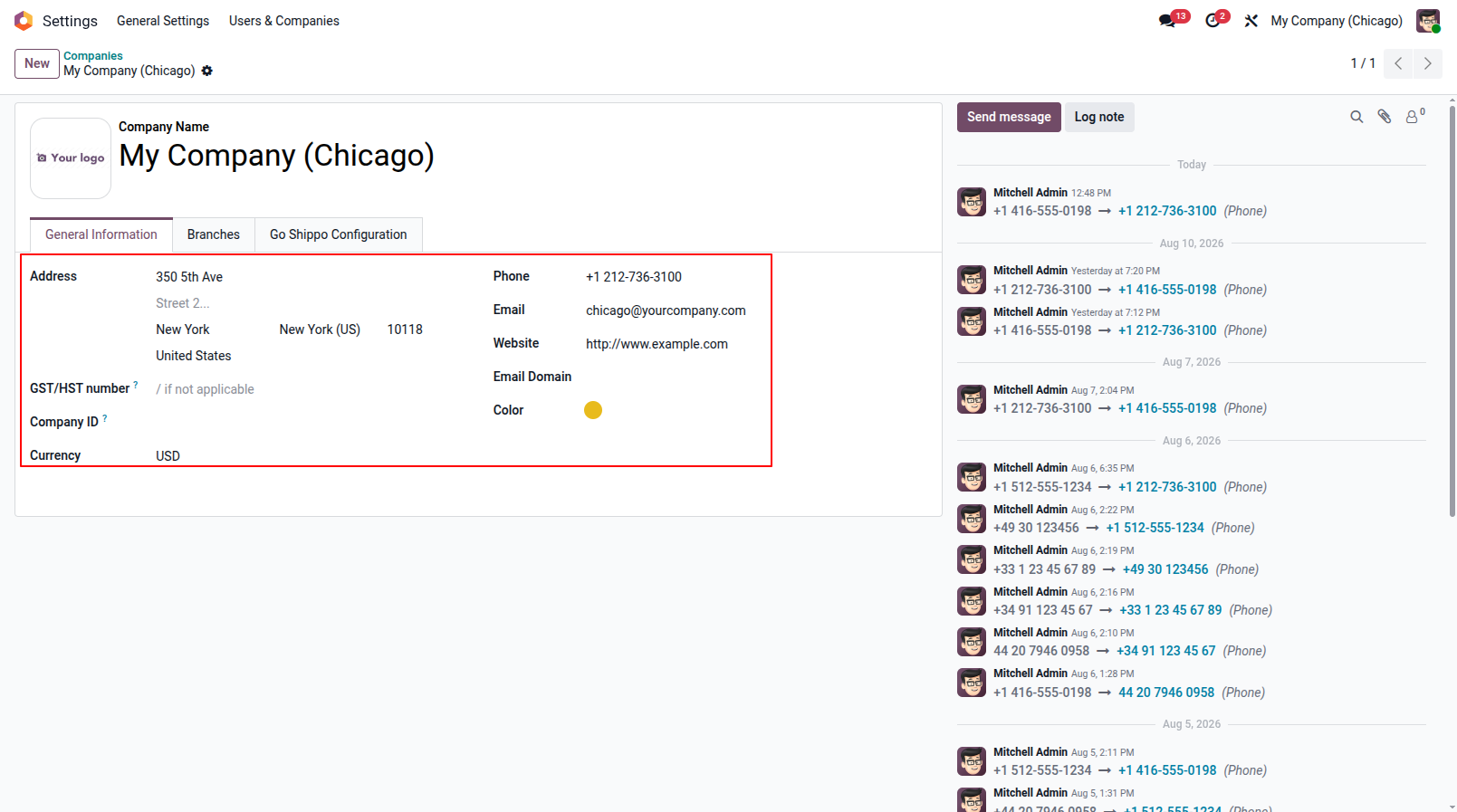
1. Company Address Setup: Configure your company's origin address & Customers address properly. This is mandatory for carriers like USPS to validate the origin and generate accurate shipping labels.
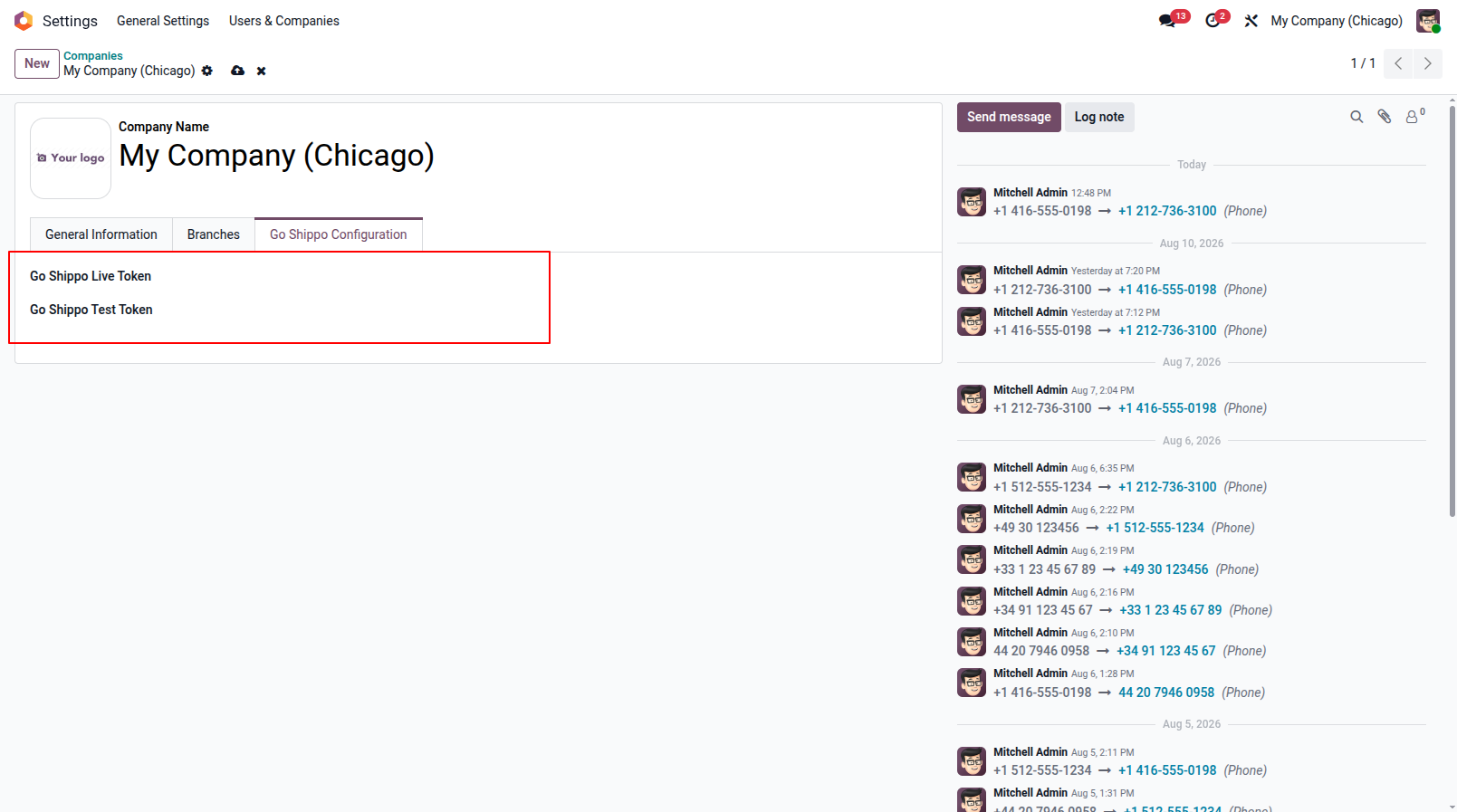
2. API Token Configuration: Securely input your Shippo Live Token for production and Test Token for sandbox environments.
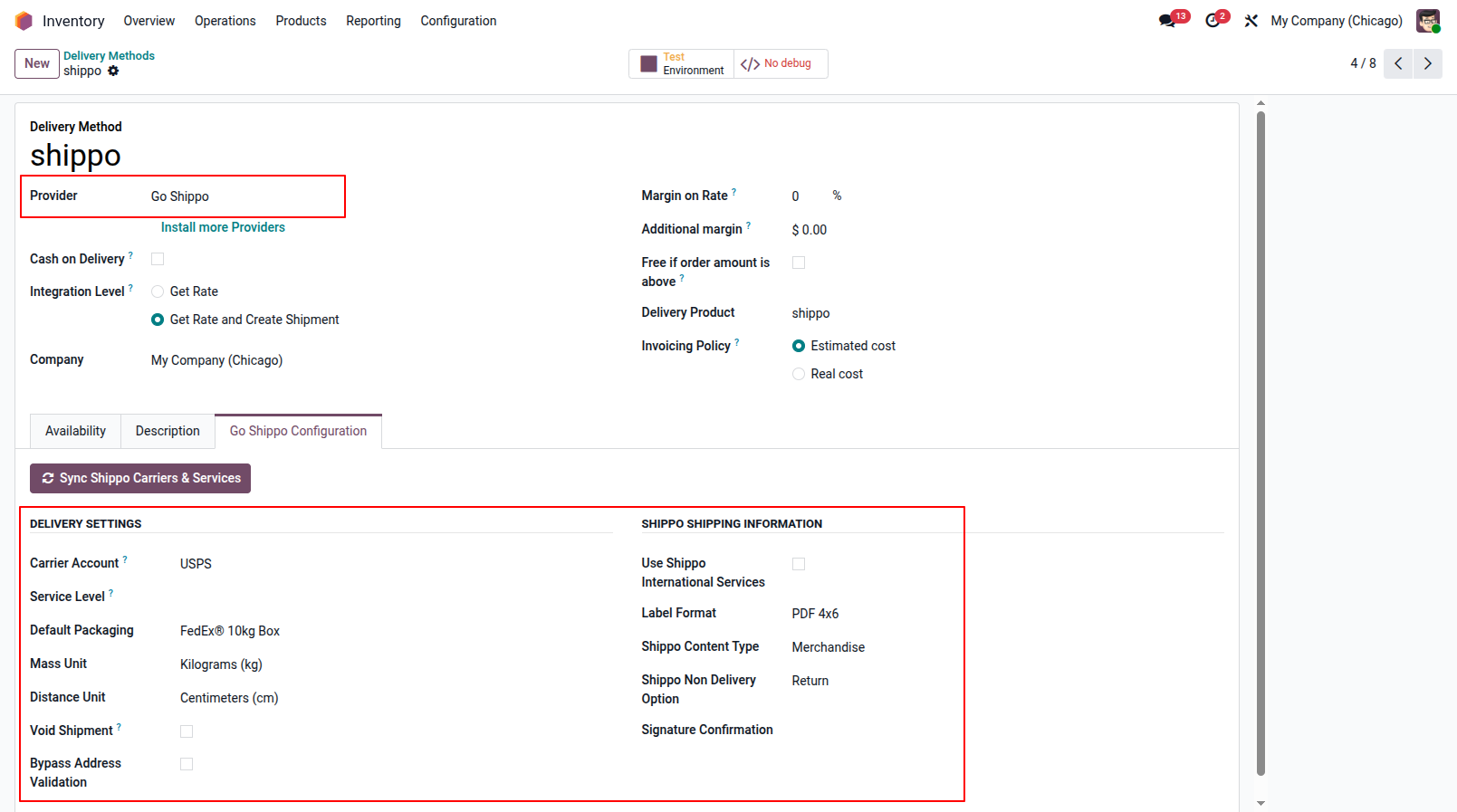
3. Delivery Method Configuration: Select 'Go Shippo' as the provider in your Delivery Method. Configure advanced carrier settings like margins, custom label formats, package dimensions, and signature options.
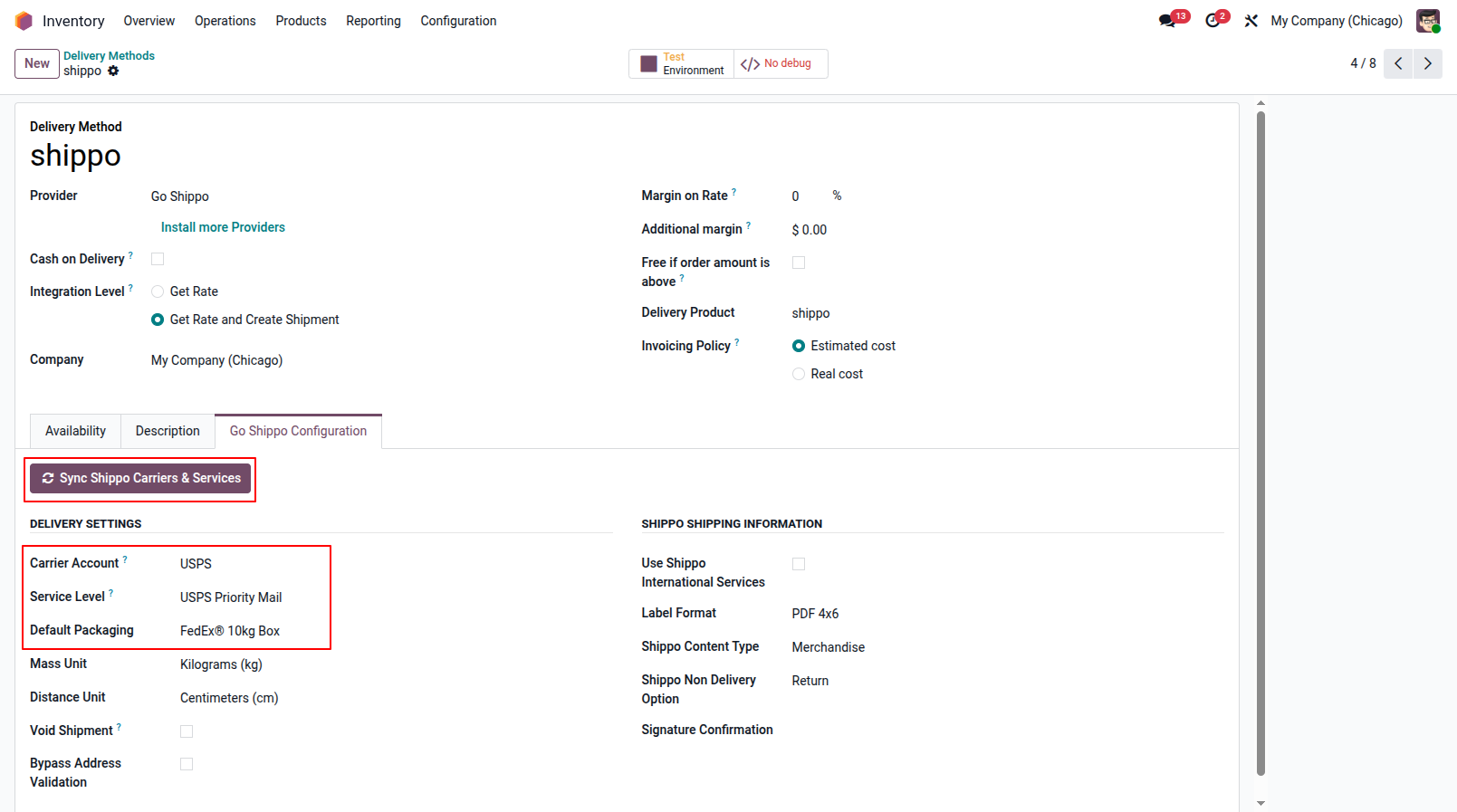
4. Manual Data Synchronization: Click on the 'Sync' button to directly fetch all available carriers, delivery services, and package types from your Shippo account in real-time.
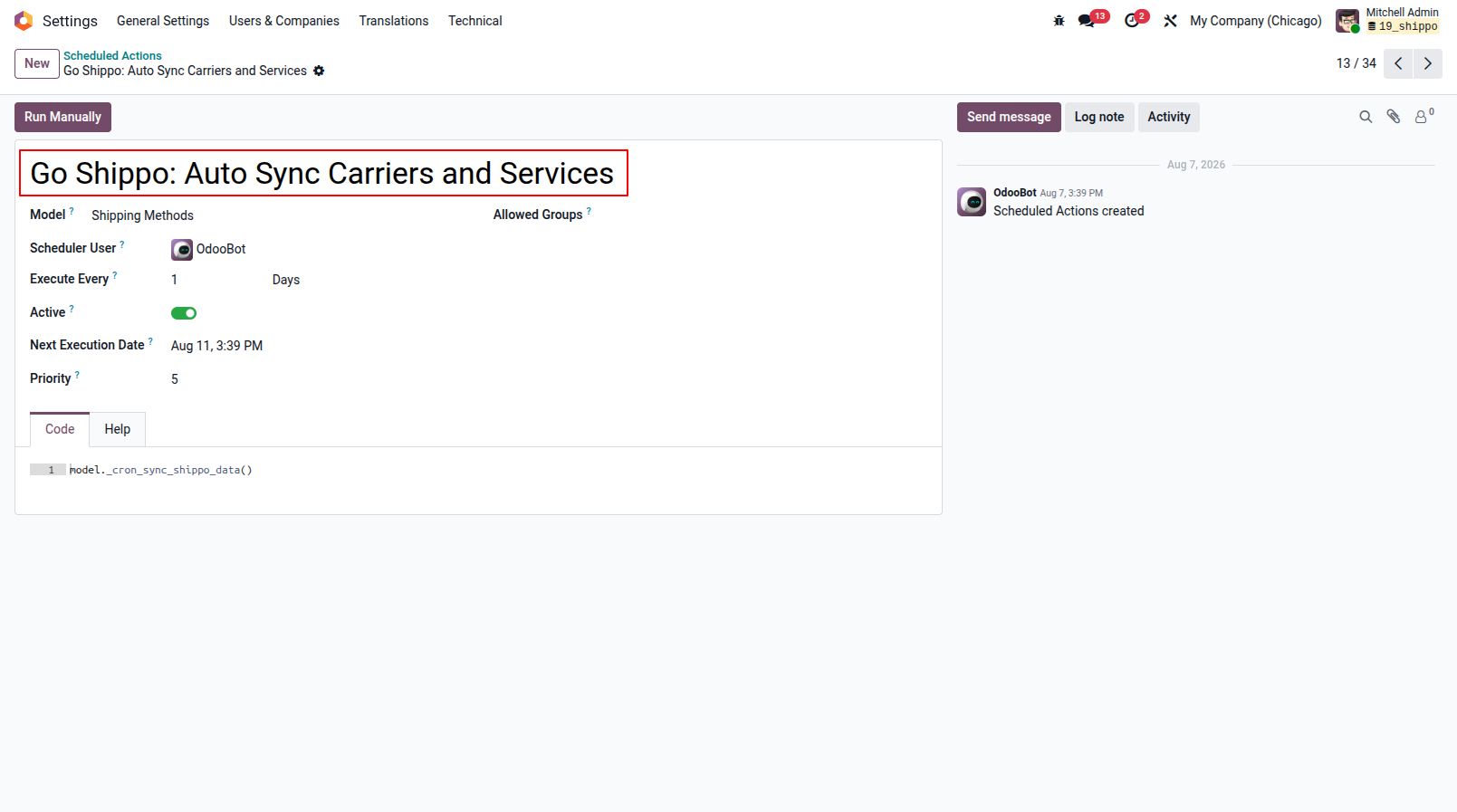
5. Automated Cron Synchronization: You can fully automate this process using the built-in scheduled action (cron job). It will run daily to ensure your carriers, services, and packages are always up to date without manual effort.
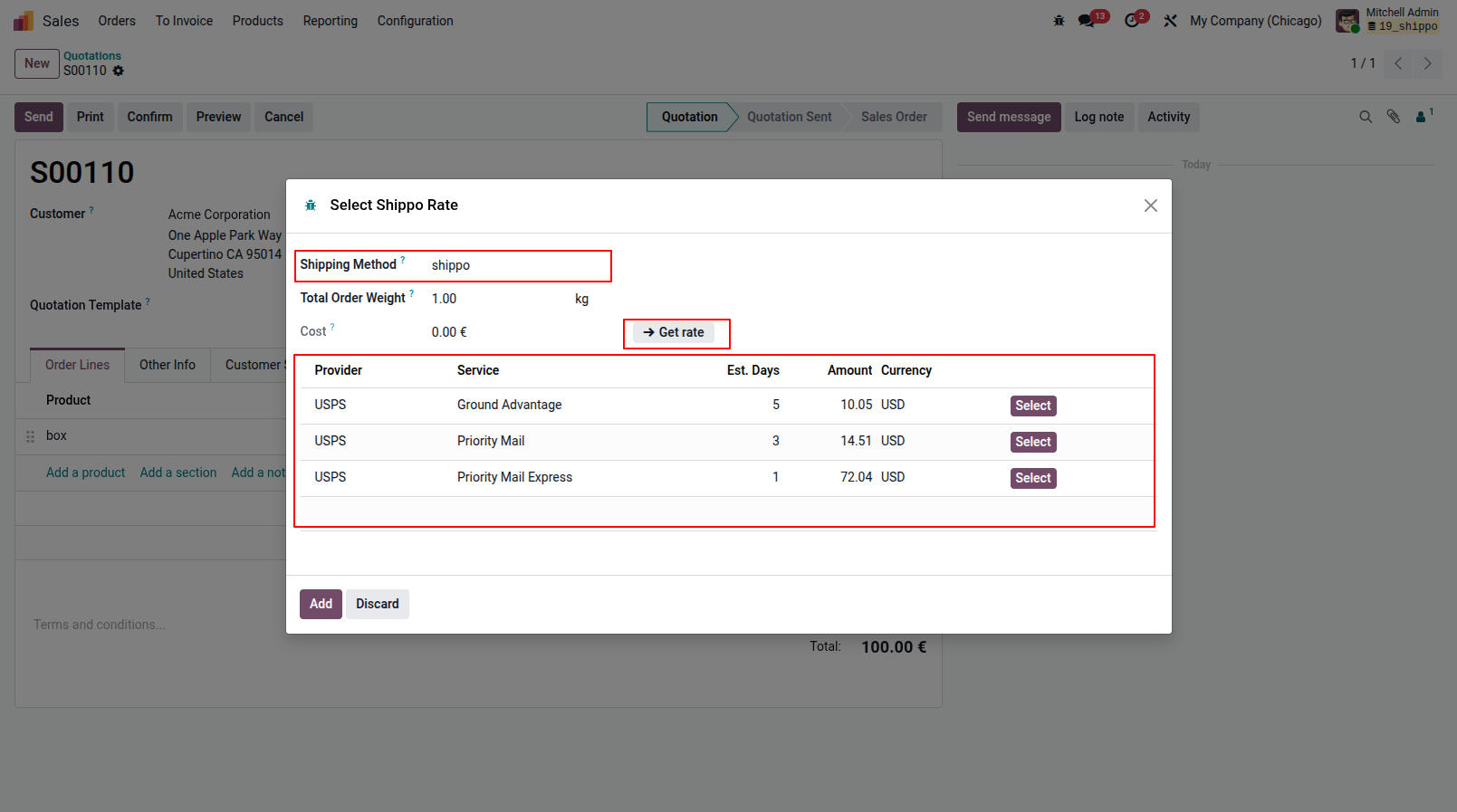
6. Live Rate Fetching: While creating a Quotation or Sales Order, simply select your Go Shippo delivery method and click 'Get Rate'. Odoo instantly communicates with Shippo to fetch accurate, real-time rates for available services based on package weight and destination.
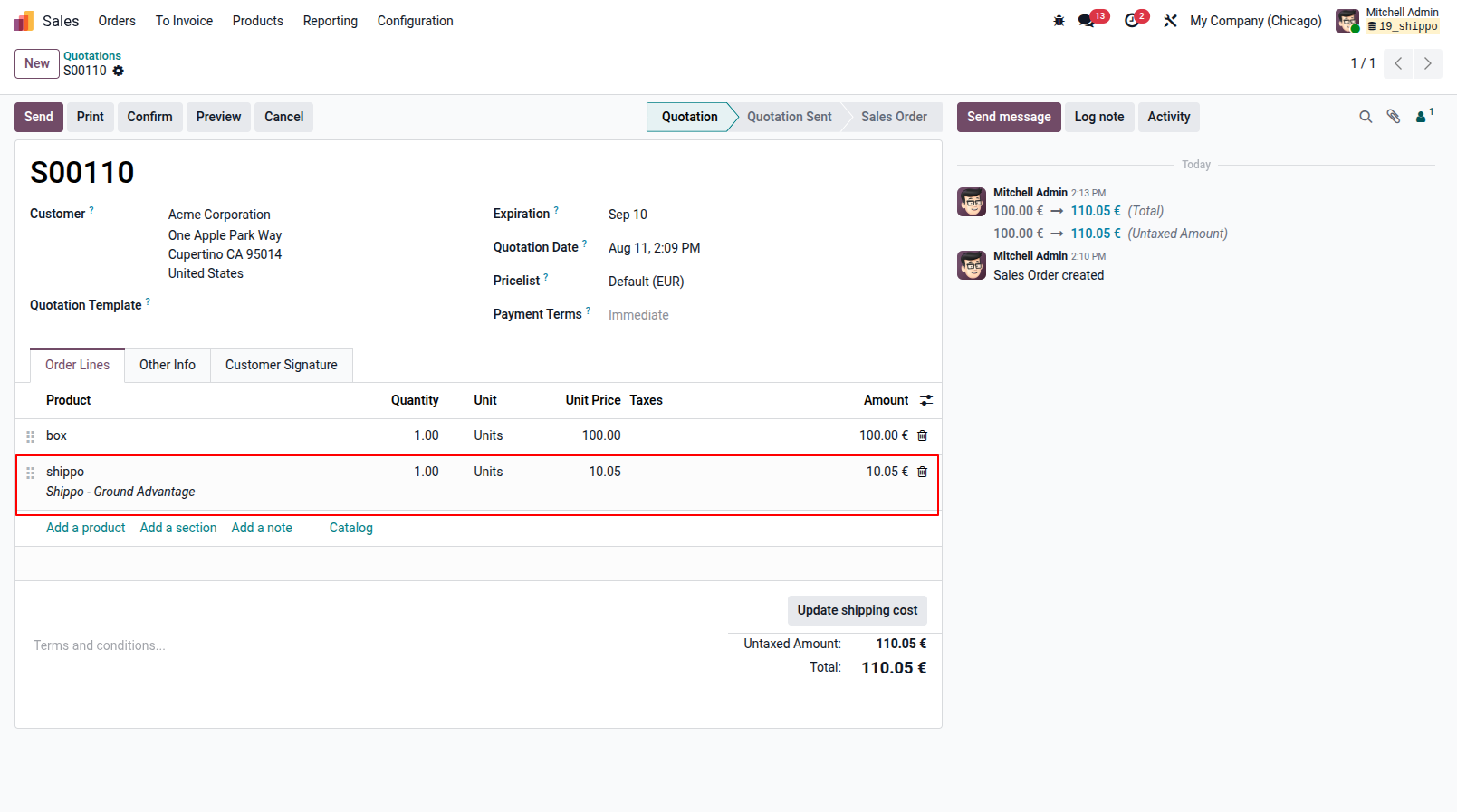
7. Order Line Integration: Once you select a preferred shipping rate from the dialog, it is seamlessly added to the Sales Order as a dedicated order line with the exact cost and carrier service name.
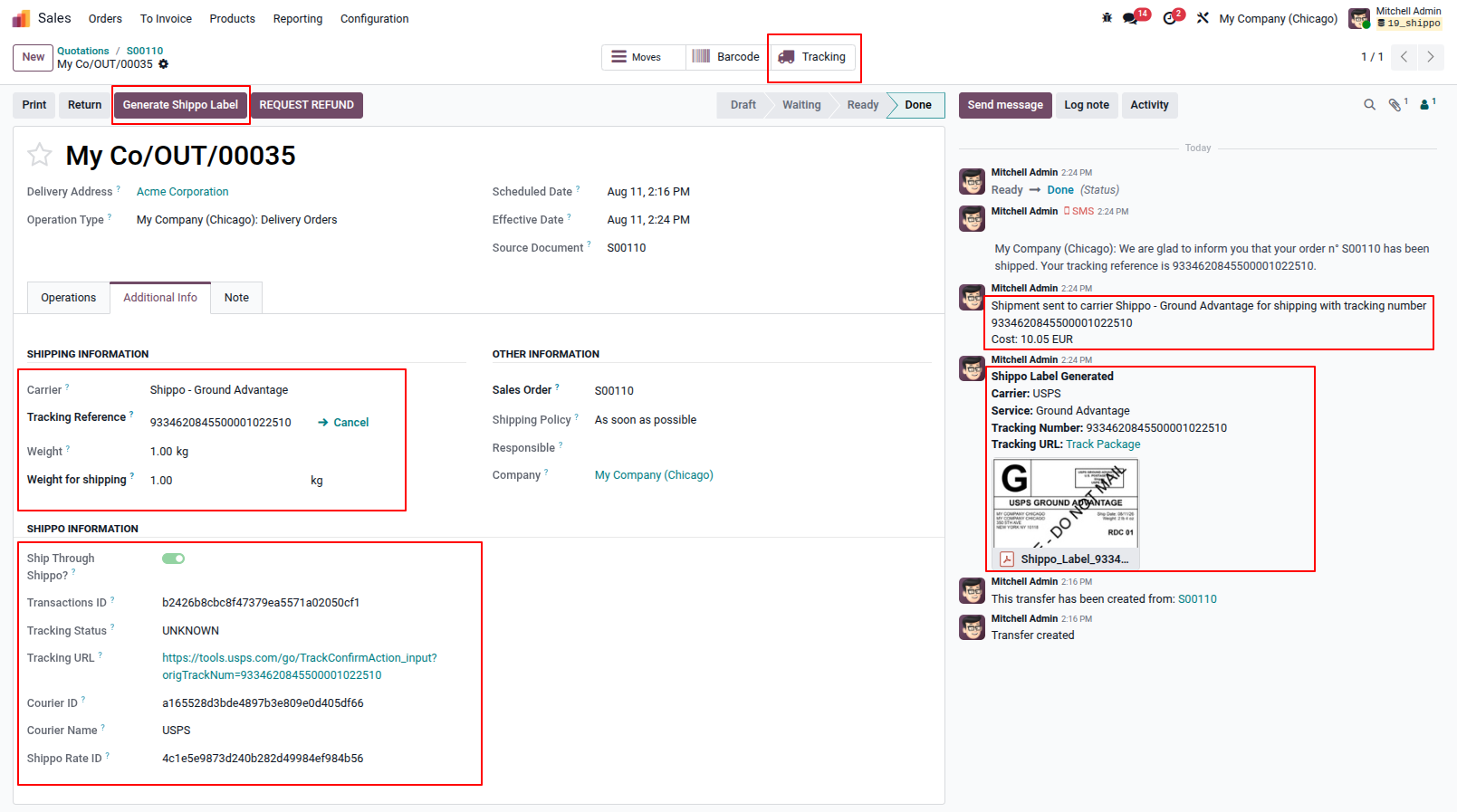
8. Delivery Order Validation & Label Generation: Upon validating the delivery order, Odoo automatically connects with Shippo to generate the shipping label. The Tracking Reference, Tracking URL, and detailed carrier info are instantly populated, and the printable label is attached directly to the chatter.
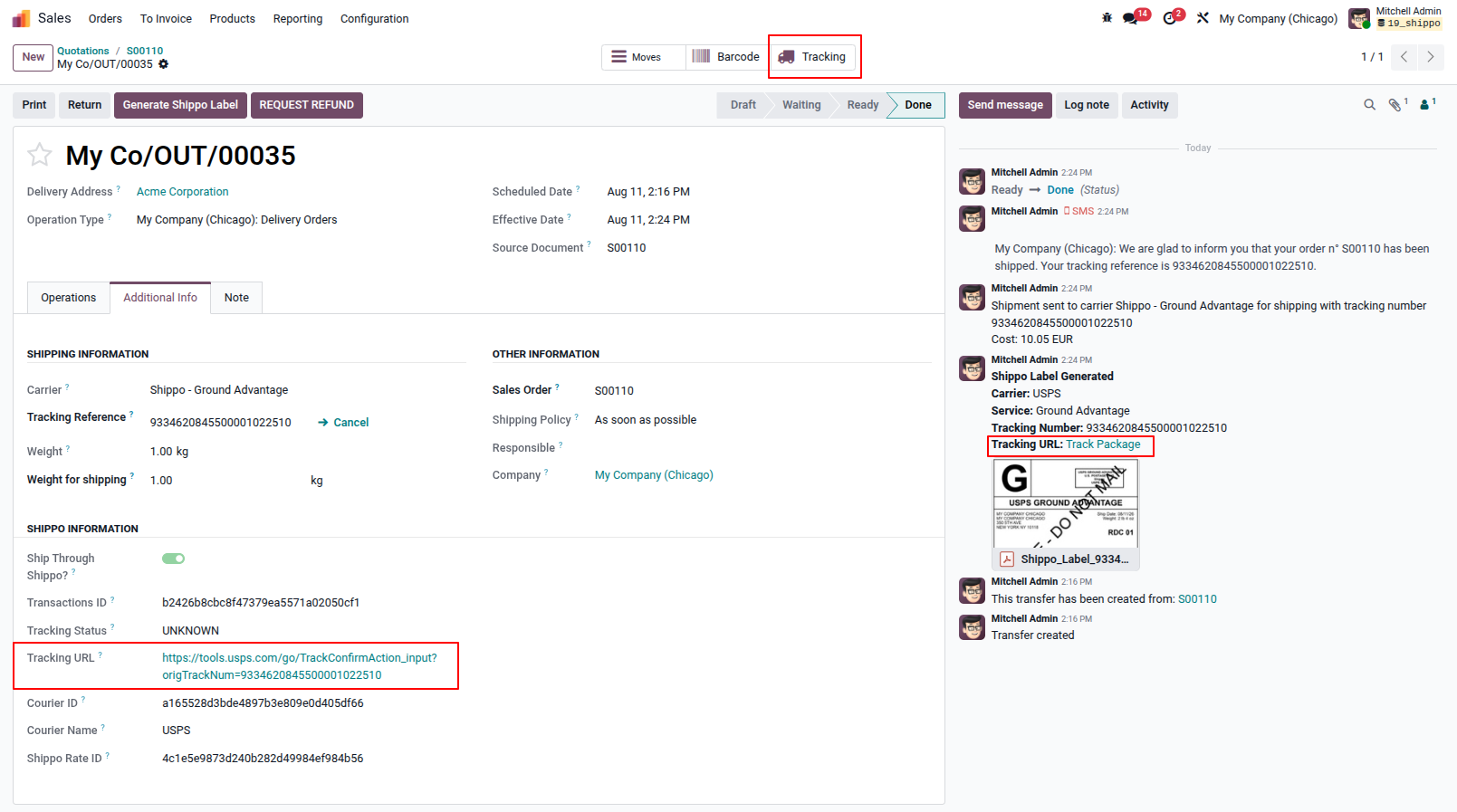
9. Real-Time Order Tracking: Click on the 'Tracking' smart button or the tracking link in the chatter to be instantly redirected to the carrier's official tracking page (e.g., USPS), allowing you to monitor live shipment statuses seamlessly.
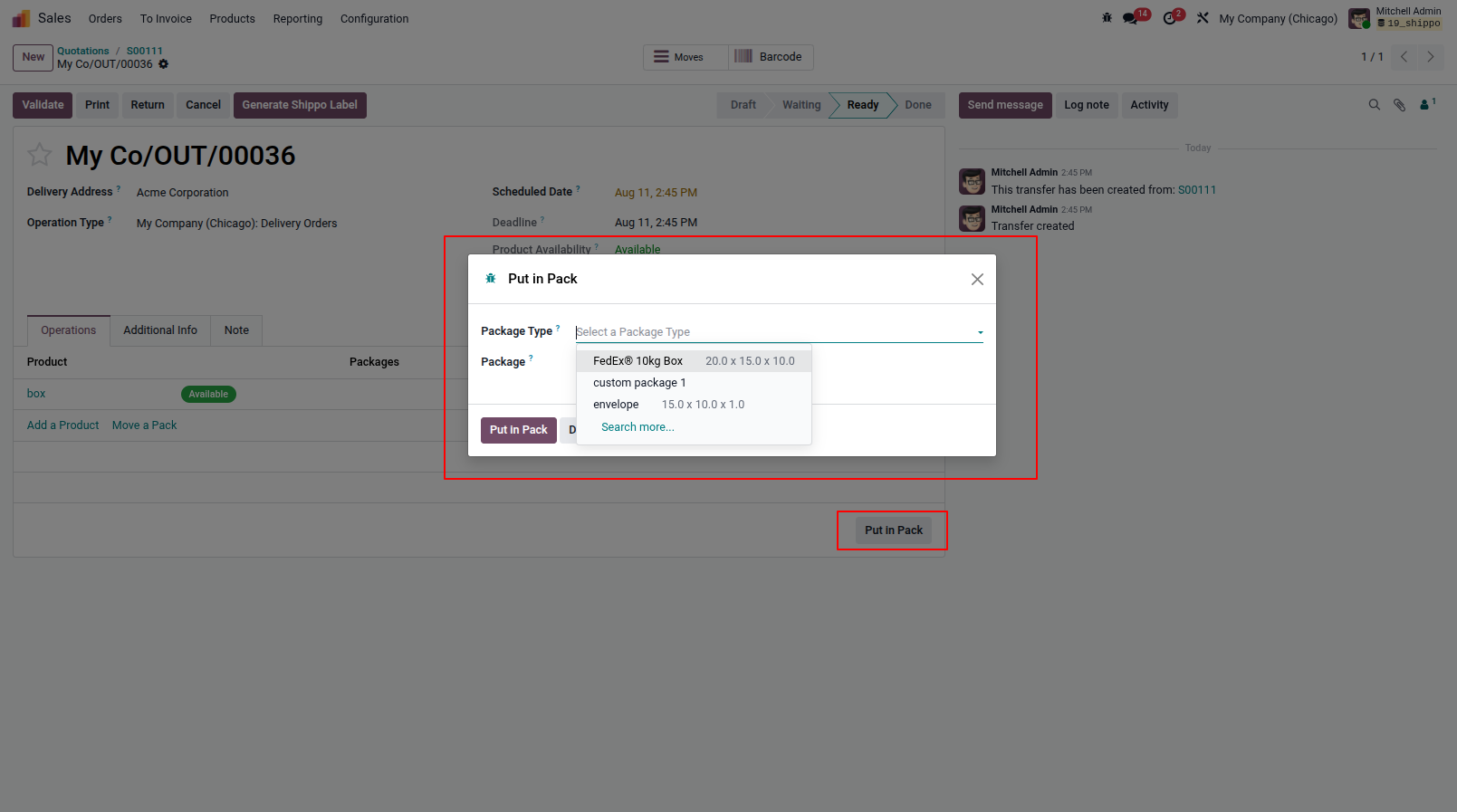
10. Custom Packaging & 'Put in Pack': When organizing your delivery, use the native 'Put in Pack' feature. All package templates and box dimensions synced from your Shippo account or configured in Odoo will automatically populate in the dropdown for accurate dimension-based packing.
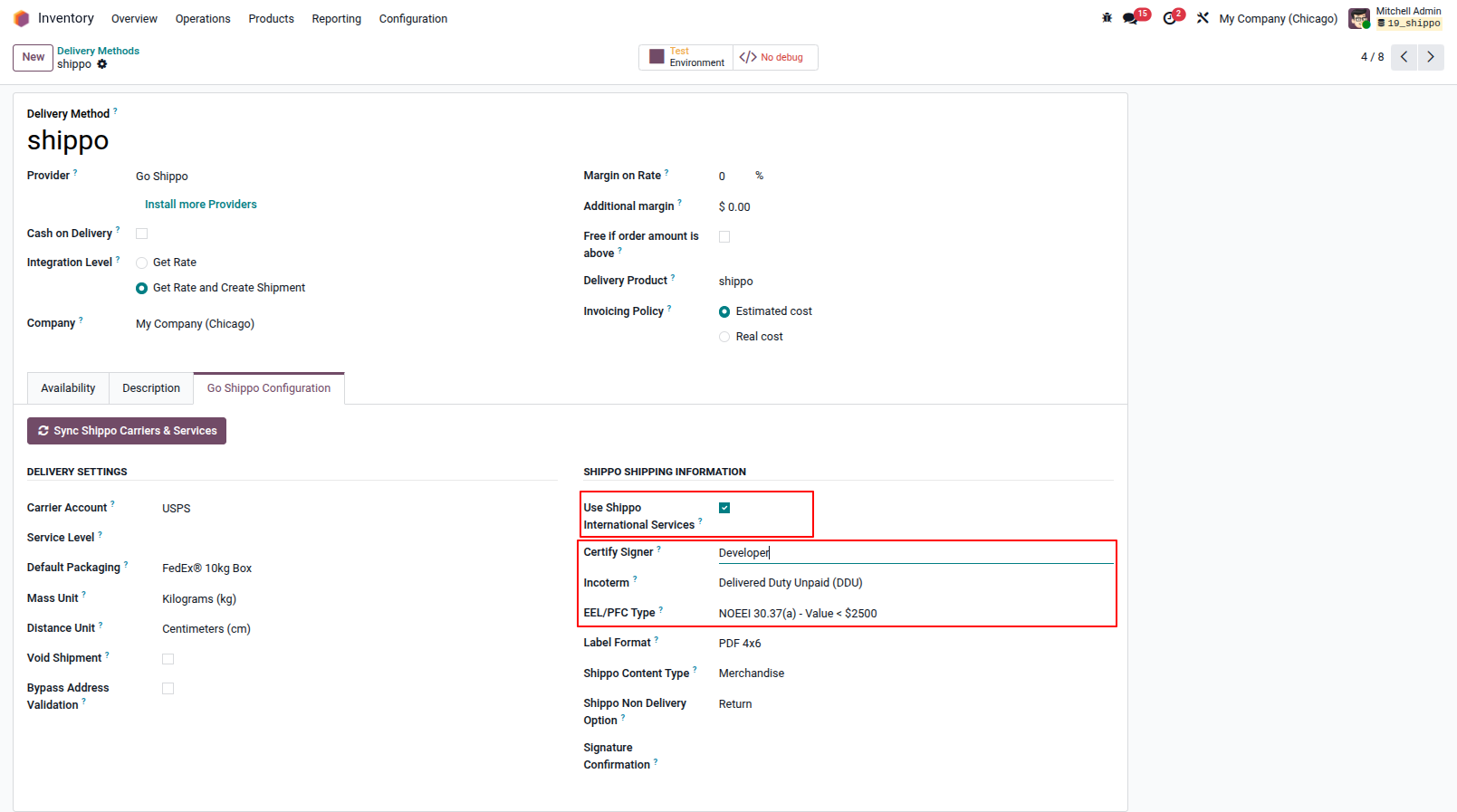
12. International Shipping Configuration: To handle international deliveries, seamlessly configure customs settings directly within the Delivery Method. You can define Incoterms (e.g., DDU/DDP), EEL/PFC Types, Content Types, and precise Custom Label formats essential for global logistics.
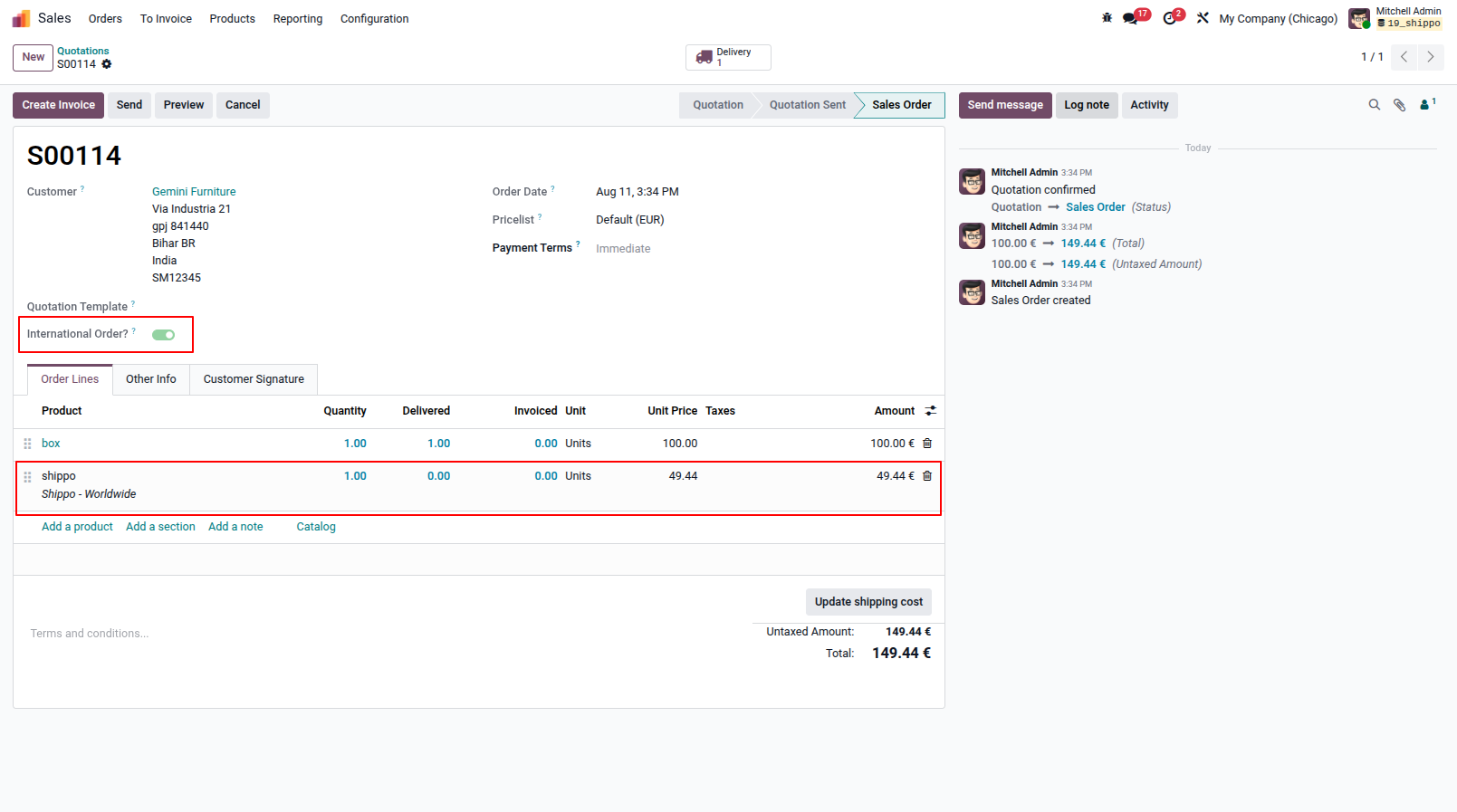
13. Automated International Order Detection:if a shipment is bound for an international destination, Odoo automatically detects it and toggles the 'Is International Order' flag on the Sales and Delivery Orders, ensuring customs compliance.
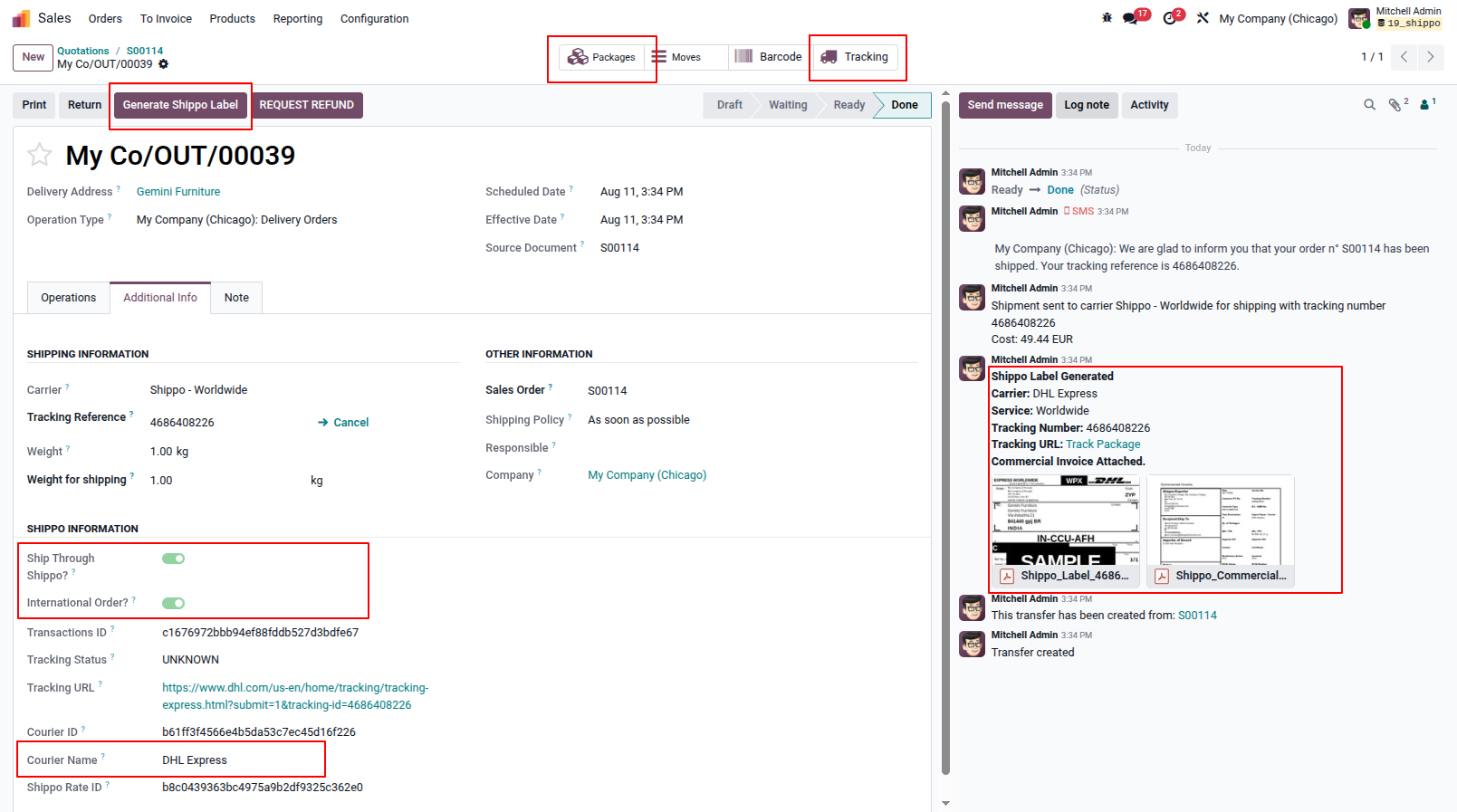
14. Customs Validation & Label Generation: When processing an international Delivery Order, validating it intelligently passes all predefined customs information to the carrier, ensuring a frictionless border crossing without manual data entry.
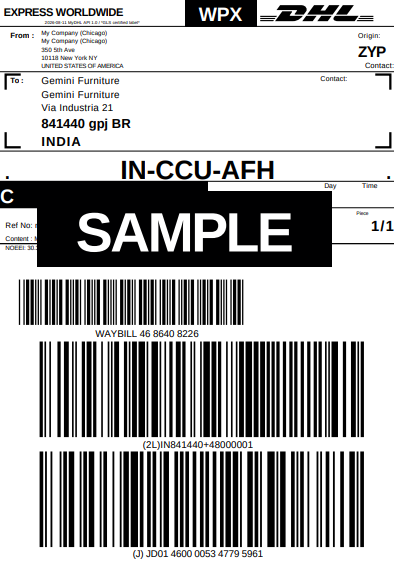
15. Multi-Label Generation: For international shipments, the integration automatically generates and attaches both the standard shipping label and the required commercial customs invoice directly to your Odoo chatter.
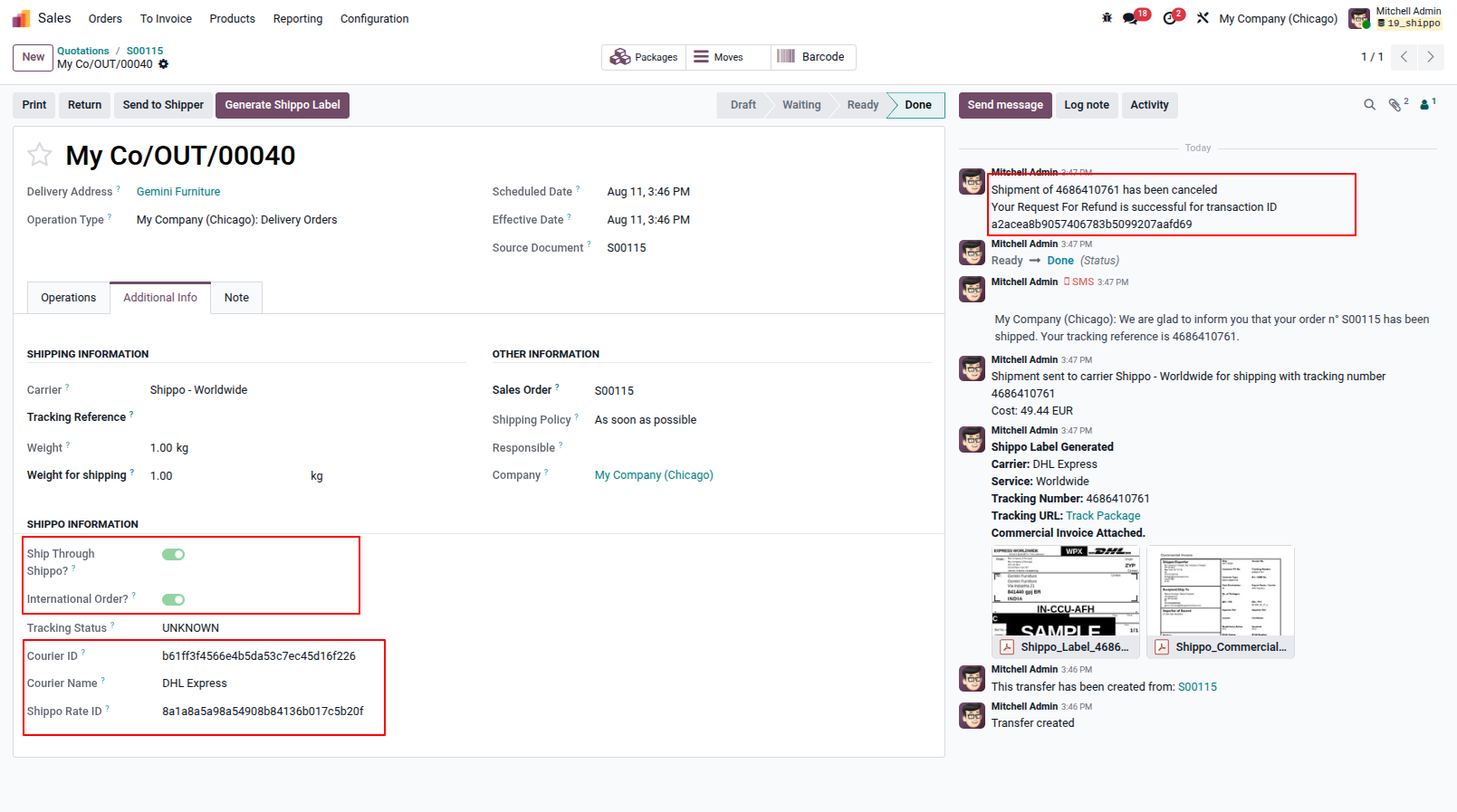
16. Label Voiding & Refunds: Easily cancel shipments and request refunds for unused labels with a single click directly from the Delivery Order, keeping your Shippo billing perfectly in sync.
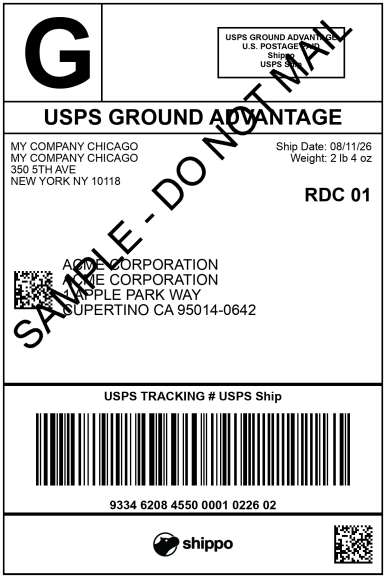
11. Shipping Label Preview & Printing: Once generated, the official shipping label (e.g., USPS) is readily available for preview and printing in high-quality PDF or ZPL format directly from the Odoo interface.
Our solutions focus on your problems
- Odoo Implementation
- Odoo Customization
- ERP Development and Implementation
- Odoo Ipass Cloud
- AI for Odoo
- Odoo Apps
- Aws Marketplace Products
- Business Engines
Our Pricing includes User Manual, 90 Days Support (Monday-Friday 10am to 7pm IST) and One time Setup
• Works & tested on standard installations of Odoo with no third party apps,
• Free support only for odoo installations with no third party apps,
• Paid support available for Odoo installations with third party apps.

Prefortune is a Odoo Official Partner, Odoo Development company. Our philosophy is to use Open Source tools and technologies to provide cost effective and green solutions for our customers.
Prefortune Technologies LLP is working on web development, Mobile development, and Odoo ERP.
If you need any help or want more additional features, you may contact us through:
Alternative Products
These other products might interest you
Specifications
| Version | 19.0, 18.0, 17.0, 16.0, 15.0, 14.0 |